Deploy a model using Neural Processing Engine
A model DLC (quantized or non-quantized) can be deployed via a SNPE enabled app (an application written using SNPE C/C++ APIs). SNPE offers APIs to load a DLC, select a runtime to run the model, and perform inference, etc.SNPE provides a prebuilt snpe-net-run tool (application written using C APIs) that can load an arbitrary model DLC and run it on provided inputs.
- Model file: DLC model file generated by the SNPE converter tool or
snpe-dlc-graph-prepare tool (if running on HTP).
- Input list: Text file, like the
input_list.txt file used during quantization, except input raw files in this list are used for inference. For simplicity in this example, the same input list used for quantization is used for inference.
- Runtime: User must select a specific runtime to run the model on target. Available runtime options are CPU, GPU, and DSP (HTP).
See snpe-net-run --help for more details.
Run SNPE .dlc: x86 host computer
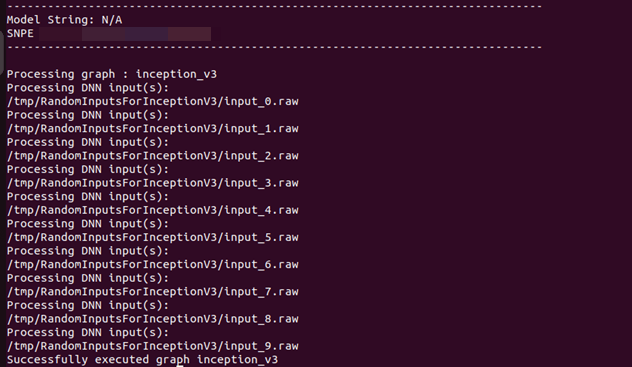
Converted SNPE .dlc can be run using the snpe-net-run tool which takes a .dlc and input list as arguments. Running SNPE DLC on x86 is purely for debugging purposes.For example, the following command loads the inception_v3.dlc model and runs the model on x86 CPU. It generates output files to /output_x86/.The default runtime in SNPE is CPU. When executing a model using snpe-net-run, there is no need to specify the CPU runtime.
Prepare a SNPE model to run on target
To run the model on target, snpe-net-run requires the model .dlc, SNPE runtime libraries, and input list to run inferences to generate outputs.Before running on target, ensure that the SNPE SDK binaries and libraries are pushed to the target.
${QAIRT_ROOT}/lib/aarch64-oe-linux-gcc11.2 and ${QAIRT_ROOT}/bin/aarch64-oe-linux-gcc11.2Use the correct DSP Hexagon architecture libraries for Qualcomm evaluation kits:Hexagon architecture libraries for Qualcomm evaluation kits
For other HW Hexagon Architecture, please check this page. scp commands need to be executed on the host computer to copy SNPE SDK libraries and binaries to the device.Replace <dsp-arch> with 75 for IQ-8275, 73 for IQ-9075, and 68 for Qualcomm Dragonwing™ RB3 Gen 2.
Run SNPE .dlc: Arm-based CPU
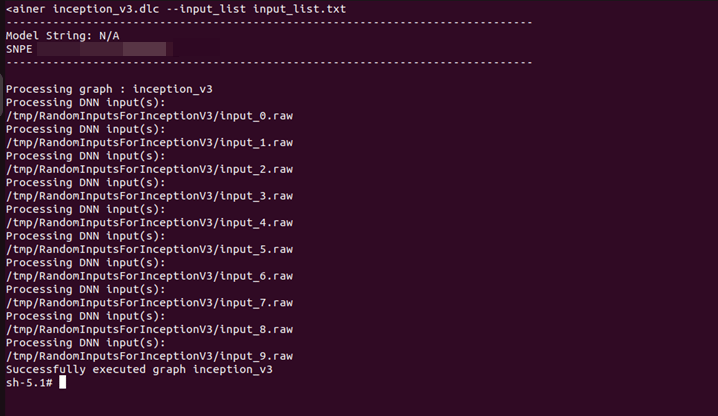
Setup environment variables before executing the model to ensure SNPE binaries and libraries are accessible to run the model.The default runtime in SNPE is CPU. When executing a model using snpe-net-run, there is no need to specify the CPU runtime.
Run SNPE DLC: GPU
To run a model on the GPU runtime, use inception_v3.dlc and save outputs in output_gpu.In the terminal of the target device, run the following command to enable the GPU delegate and backend:To run on GPU, specify the runtime with the --use_gpu command line argument.
Run SNPE DLC: HTP
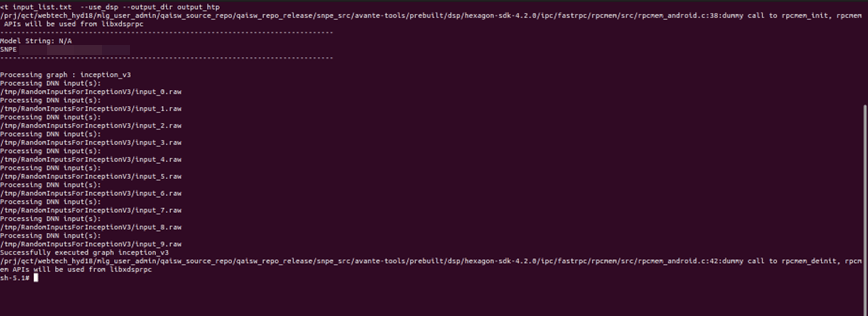
To run a model on the HTP backend, use inception_v3_quantized_with_htp_cache.dlc and save outputs in output_htp.To run on HTP, specify the runtime with the --use_dsp command line argument.
Validate output
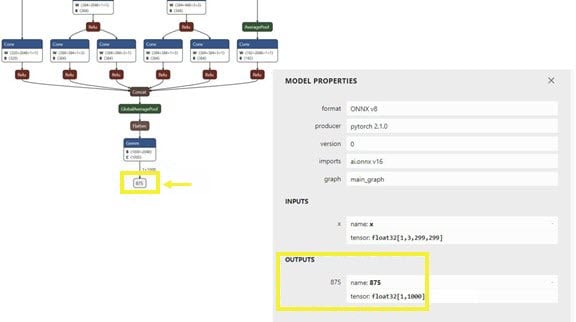
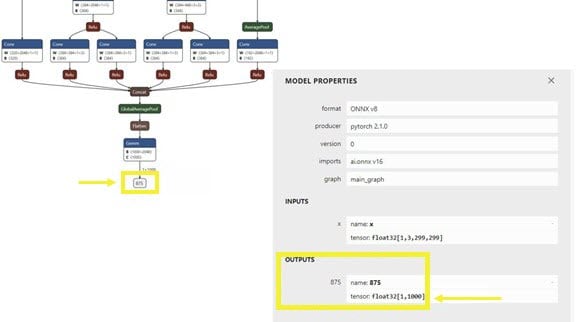
For each input raw file fed to snpe-net-run (via the input_list file), an output folder is generated that contains output tensor saved as raw file(s) whose size will match the model’s output layer as shown in the image below.The Netron tool was used to visualize the model. inception_v3 example, the output raw file is a binary file that contains probabilities for 1000 classification classes.We use a Python script to read the file as a NumPy array to perform postprocessing and output validation. The example below checks whether HTP prediction is the same as CPU prediction.Copy output files to the host computer
Copy the output files from the target device to the host computer so the outputs can be validated.Use <path> from the above commands in the following (compare.py) python script.
Compare CPU and HTP output tensors
Once outputs from on-device inference are copied to the host computer, prepare a script to load the output tensors saved in output_htp and output_cpu to compare.In this example, both output_htp and output_cpu are copied to the ~/models directory.The following is an example script to compare output from one of the example inputs used. Outputs from snpe-net-run can be loaded into NumPy ndarrays using the numpy.fromfile(…) API.By default, snpe-net-run saves the output tensors to NumPy files in float32 format.
Deployment using SNPE APIs
SNPE SDK provides C/C++ APIs to create/develop applications that run a model on chosen hardware (CPU, GPU, or HTP) with acceleration. See the sample application that demonstrates SNPE C/C++ APIs.To improve the developer experience when building entire use case pipelines (stream from camera, preprocess images, perform inference, etc.), SNPE has been integrated into the Qualcomm IM SDK as a plugin (qtimlsnpe).The plugin has been developed on top of the SNPE C APIs and provides SNPE capabilities (load and run models). With the qtimlsnpe plugin, you can use your converted model DLC in a Qualcomm IM SDK pipeline to realize the use case.See the Qualcomm IM SDK overview for instructions on how to deploy SNPE DLC using the Qualcomm IM SDK.Deploy a model using AI Engine Direct
A model .so (quantized or non-quantized) can be deployed through a QNN enabled app (an application written using QNN C/C++ APIs). QNN offers APIs to load a model .so dynamically and run the model on hardware with the selected backend.QNN provides a prebuilt tool (qnn-net-run) that can dynamically load this model .so and perform inference on a selected backend using provided inputs.For CPU, GPU, or HTP execution, qnn-net-run requires the following arguments:
- Model file: .so file generated by
qnn-model-lib-generator
- Backend file: .so file for the targeted backend
libQnnCpu.so for the CPU backend.libQnnGpu.so for the GPU backend.libQnnHtp.so for the HTP backend.
- Input list: Text file like the input_list.txt file used during quantization, except input raw files in this list are used for inference. For simplicity, this example uses the same input list used for quantization for inference.
Run QNN .so: x86 host computer
Converted QNN .so can be run using the qnn-net-run tool which takes a model .so, backend library .so, and input list as arguments.For example, the following command loads the libinception_v3.so model and runs the model on x86 CPU. It generates output files to ~/models/output_x86/.Prepare a QNN model to run on target
To run the model on target, qnn-net-run requires the model .so, QNN binaries and runtime libraries, and input list to run inferences to generate outputs.Before running on target, ensure that the QNN SDK binaries and runtime libraries are pushed to the target.
${QAIRT_ROOT}/bin/aarch64-oe-linux-gcc11.2 and ${QAIRT_ROOT}/lib/aarch64-oe-linux-gcc11.2Use the correct DSP Hexagon architecture libraries for Qualcomm evaluation kits:Hexagon architecture libraries for Qualcomm evaluation kits
For other HW Hexagon Architecture, please check this page. scp commands on the host computer to copy QNN SDK libraries and binaries to the device.Replace <dsp-arch> with 75 for IQ-8275, 73 for IQ-9075, and 68 for Qualcomm Dragonwing™ RB3 Gen 2.
Run QNN .so: Arm-based CPU
When running a model on an Arm-based CPU, qnn-net-run requires the model .so, backend .so library, and input list to run inference to generate outputs.For RB3Gen2 targets, the .so must be cross-compiled with the aarch64-oe-linux-gcc11.2 toolchain.For example, the following commands write output files to /opt/output_cpu/.Run a QNN model on GPU
In the terminal of the target device, run the following command to enable the GPU delegate and backend:When executing a model on Adreno GPU, qnn-net-run requires the model .so, backend .so library (libQnnGpu.so), and input list to run inference to generate outputs.For example, the following commands write output files to /opt/output_gpu/.Run QNN model on HTP backend
To run a model on HTP backend, use the libquantized_inception_v3.so library and libQnnHtp.so backend library and save outputs in the output_htp directory.Validate output
For each raw input file fed to qnn-net-run (through the input_list file), an output folder is generated that contains raw output file(s) whose size matches the model’s output layer as shown in the image below.In this inception_v3 example, the raw output file is a binary file that contains probability for 1000 classification classes.You can use a Python script to read the file as a NumPy array to perform postprocessing and validation of the output. The example script below checks whether HTP prediction is the same as CPU prediction.Use the <path> from the above commands in the following Python script.
qnn-net-run tool are copied from the device to the host computer, create a simple Python script to load outputs from CPU and HTP execution and compare them using NumPy.Output:Deployment using QNN APIs
The Qualcomm AI Engine Direct SDK provides C/C++ APIs to create/develop applications that can load a compiled .so model and run it on a chosen backend (CPU, GPU, or HTP) with acceleration. See the sample application that demonstrates QNN C/C++ APIs.Deployment using Qualcomm IM SDK
To improve the developer experience when building entire use case pipelines (stream from camera, preprocess images, perform inference, etc.), QNN has been integrated into the Qualcomm IM SDK as the qtimlqnn plugin.The plugin has been developed on top of QNN C APIs and provides capabilities to dynamically load and run models. With the qtimlqnn plugin, developers can use their converted and compiled model library in the Qualcomm IM SDK pipeline to realize their use case.See the Qualcomm IM SDK overview for instructions on how to deploy QNN models using Qualcomm IM SDK.Deploy a model using QAIRT
A model .bin can be deployed through a QAIRT enabled app (an application written using QAIRT C/C++ APIs). QAIRT offers APIs to load a model .bin dynamically and run the model on hardware with the selected backend.QAIRT provides a prebuilt tool (qairt-net-run) that can dynamically load this model .bin and perform inference on a selected backend using provided inputs.For CPU, GPU, or HTP execution, qairt-net-run requires the following arguments:
- Model file:
.bin file generated by qairt-dlc-prepare to inference on HTP and .dlc file generated using qairt-converter to inference on CPU and GPU.
- Backend file:
.so file for the targeted backend.
libQairtCpu.so for the CPU backend.libQairtGpu.so for the GPU backend.libQairtHtp.so for the HTP backend.
- Input list: Text file like the
input_list.txt file used during quantization, except input raw files in this list are used for inference. For simplicity, this example uses the same input list used for quantization for inference.
Run DLC on x86 host computer
Converted QAIRT DLC can be run using the qairt-net-run tool which takes a model .dlc, backend library .so, and input list as arguments. For example, the following command loads the inceptionv3.serialized.bin model and runs the model on x86 CPU. It generates output files to ~/models/output_x86/.Run the below command to inference model on x86 machine:Preparation to run model on target
To run the model on target, qairt-net-run requires the model .bin, .dlc, QAIRT binaries and runtime libraries, and input list to run inferences to generate outputs.Before running on target, ensure that the QAIRT SDK binaries and runtime libraries are pushed to the target.
${QAIRT_ROOT}/bin/aarch64-oe-linux-gcc11.2 and ${QAIRT_ROOT}/lib/aarch64-oe-linux-gcc11.2.Use the correct DSP Hexagon architecture libraries for Qualcomm evaluation kits:Run the following scp commands on the host computer to copy QAIRT SDK libraries and binaries to the device.Replace <dsp-arch> with 75 for IQ-8275, 73 for IQ-9075, and 68 for Qualcomm Dragonwing™ RB3 Gen 2.
Run QAIRT .dlc on ARM based CPU
When running a model on an Arm-based CPU, qairt-net-run requires the model .dlc, backend .so library, and input list to run inference to generate outputs.
For example, the following commands write output files to /opt/output_cpu/.Run a QAIRT model on GPU
Run below command to enable GPU delegate and backend:When executing a model on Adreno GPU, qairt-net-run requires the model .dlc, backend .so library (libQairtGpu.so), and input list to run inference to generate outputs.
For example, the following commands write output files to /opt/output_gpu/.Run a QAIRT model on HTP
To run a model on HTP backend, use the model .bin file and libQairtHtp.so backend library and save outputs in the output_htp directory.Validate output
For each raw input file fed to qairt-net-run (through the input_list file), an output folder is generated that contains raw output file(s) whose size matches the model’s output layer as shown in the image below.In this inception_v3 example, the raw output file is a binary file that contains probability for 1000 classification classes. You can use a Python script to read the file as a NumPy array to perform postprocessing and validation of the output. The example script below checks whether HTP prediction is the same as CPU prediction.Once the outputs from the qairt-net-run tool are copied from the device to the host computer, create a simple Python script to load outputs from CPU and HTP execution and compare them using NumPy.Output:Deployment using QAIRT APIs
The QAIRT SDK provides C/C++ APIs to create/develop applications that can load a compiled .bin model and run it on a chosen backend (CPU, GPU, or HTP) with acceleration. See the sample application that demonstrates QAIRT C/C++ APIs.