


Audio component overview
- Application processor – CPU that handles audio processing tasks. Tasks include:
- Managing audio record and playback
- Decoding audio formats
- Using LPAI for postprocessing tasks
- Low-Power AI (LPAI) – Subsystem that runs audio playback/record and voice-activation (VA) algorithms. It integrates with a dedicated Qualcomm® Hexagon™ Processor (QDSP6) and a low-power island (LPI).
- Audio codec – Hardware that includes:
- Analog-to-Digital Converter (ADC)
- Digital-to-Analog Converter (DAC) These convert analog audio to digital, and vice versa.
- Speaker AMP and microphone – Devices that connect over I2S/TDM/SoundWire.
Architecture
The following figure shows the high-level audio software architecture.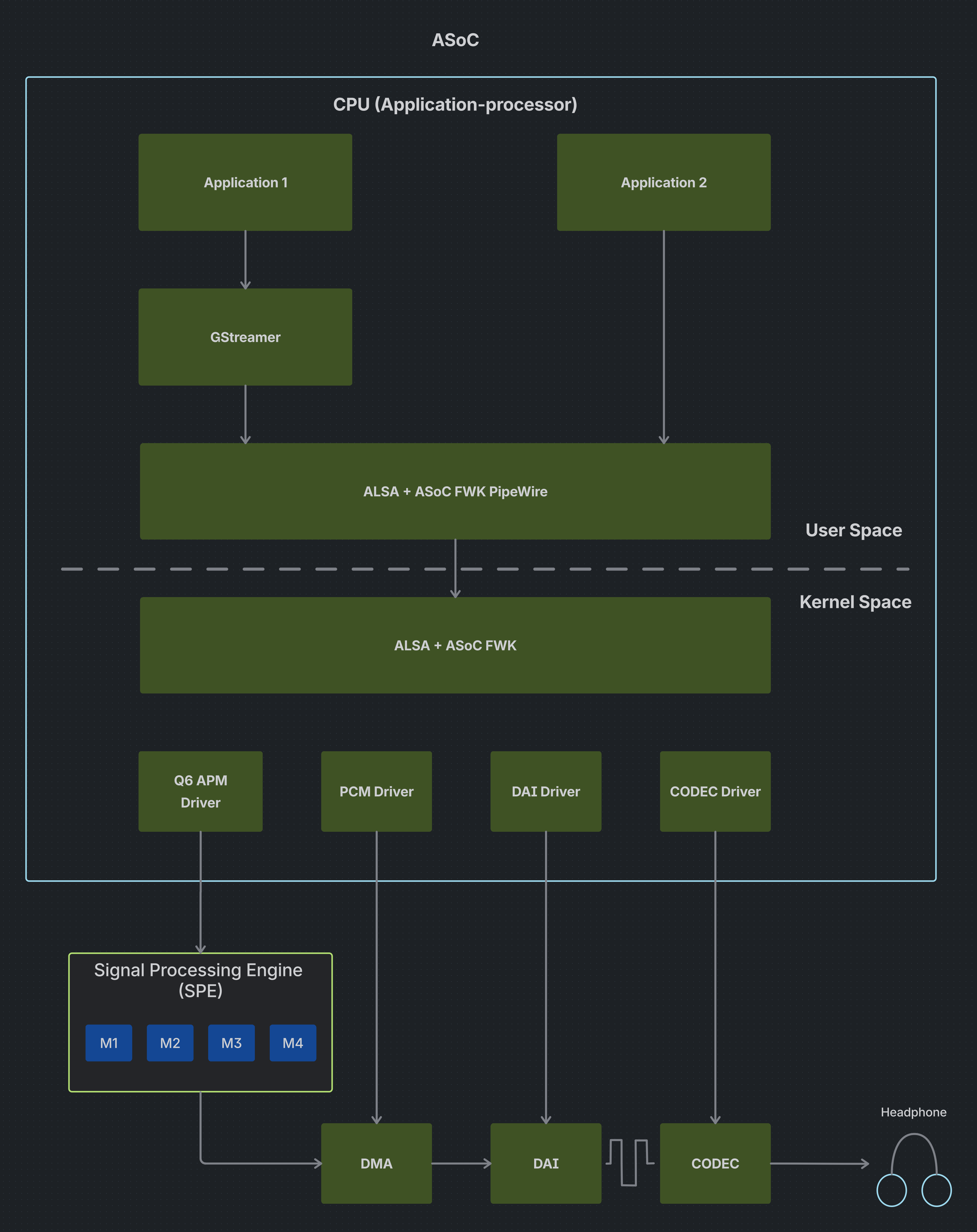
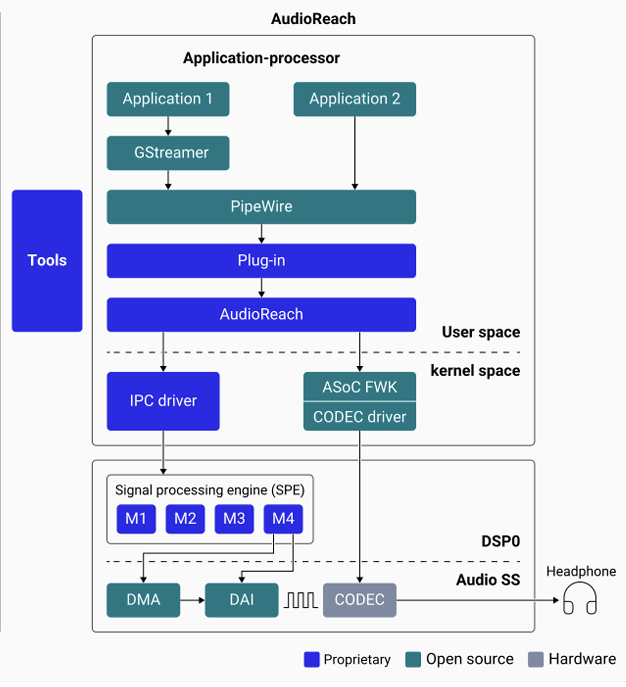
High-level audio software architecture
Config 1 vs Config 2
QLI 2.0 introduces an overlay model that allows customers to start with a clean open-source base build and optionally layer in Qualcomm’s proprietary, DSP-accelerated audio stack — without requiring a full reflash. This is referred to as the Config 1 → Config 2 transition.Config 1 — Upstream ASoC
Config 1 uses the ALSA System-on-Chip (ASoC) framework. Audio runs entirely on the application processor using upstream kernel drivers, with no dependency on Qualcomm proprietary components.Key characteristics
- Standard ALSA sound card exposed to userspace
- Audio pipeline components: Codec Driver, Platform Driver, Machine Driver
- UCM profiles (
ucm.conf) used for routing - ASoC topology binary (
.tplg) for mixer paths and routing - Compatible with
aplay,arecord, GStreamer, and PipeWire via ALSA sinks/sources
Kernel modules
The following kernel modules are loaded in a Config 1 build:q6apm_daiq6apm_lpass_daisq6prmq6prm_clockssnd-soc-sc8280xpsnd_q6apmsnd_q6dsp_common
When to choose Config 1
- Full open-source, upstream kernel-only requirement
- No requirement for DSP-accelerated audio features (SVA, Fluence, Haptics)
- Targeting mainline Linux distributions or AOSP with upstream drivers
- No-touch or low-touch integration
Build
Config 1 builds theqcom-multimedia-image.
<machine> refers to the target-specific YML file under meta-qcom/ci/. All available machine YMLs are listed in that directory. For example, for the IQ-9075 EVK (Lemans), the YML file is iq-9075-evk.yml:
Config 2 — Downstream AudioReach
Config 2 uses AudioReach — Qualcomm’s modular Signal Processing Framework (SPF) that offloads audio processing to the dedicated Hexagon DSP, enabling low-power, high-performance audio.Key characteristics
- Audio processing offloaded to ADSP (Hexagon DSP) — CPU remains idle during audio
- PAL (Platform Abstraction Layer) exposes higher-level audio APIs
- AGM (Audio Graph Manager) interfaces mixer controls and PCM plug-ins
- ACDB (Audio Calibration Database) manages graphs and tuning
- PipeWire connects to hardware via PAL source/sink plug-ins
- Supports advanced features not available in ASoC: SVA, Fluence ECNS, compressed offload, SSMD/MSMD, and real-time tuning via QACT
AudioReach userspace package stack
The following packages are installed when the Config 2 overlay is applied:When to choose Config 2
- Customer requires Qualcomm-proprietary audio features (SVA, Fluence, SSMD/MSMD)
- Power-optimized audio playback/record is a priority (ADSP offload)
- Real-time tuning via QACT is needed
- Compressed audio offload (MP3, AAC) is required
Build
Config 2 builds theqcom-multimedia-proprietary-image. It layers the full AudioReach stack on top of Config 1.
Config 2 is supported on
aarch64 targets only and requires qcom-distro.yml.<machine> refers to the target-specific YML file under meta-qcom/ci/. For example, for the IQ-9075 EVK (Lemans):
Migration path: Config 1 → Config 2
The transition from Config 1 to Config 2 is handled via an overlay mechanism. Customers do not need to reflash the base image.1
Start with Config 1 base image
Build or flash the
qcom-multimedia-image (Config 1 base).2
Apply the overlay
Apply the
qcom-multimedia-proprietary-image overlay.3
Install AudioReach packages
AudioReach packages are installed via DNF overlay.
4
Switch kernel modules
The kernel switches from upstream ASoC modules to the AudioReach kernel driver.
5
Deploy PAL and ACDB configuration
PAL/ACDB configuration files are deployed (
audioreach-conf).6
Reconfigure PipeWire
PipeWire is reconfigured to use the AudioReach PAL sink/source plugin.
7
Validate
Validate with audio test suites and QACT tuning.
Next steps
- Enable audio — Configure audio hardware and verify basic playback and capture
- Customize audio graph — Customize audio use cases at the PAL level
- Audio Addendum — Learn about QACT and QXDM for calibration and diagnostics