> ## Documentation Index
> Fetch the complete documentation index at: https://dragonwingdocs-staging.qualcomm.com/llms.txt
> Use this file to discover all available pages before exploring further.
# 相机概述
本文档介绍通过 MIPI CSI 接口接收数据的相机子系统。
USB 相机数据通过 USB 接口传输,相机子系统不涉及 USB 相机数据传输。有关 USB 相机的使用,请参见 [USB 相机配置](https://dragonwingdocs.qualcomm.com/System/Interfaces/usb)。
网络相机数据通过网络接口传输,相机子系统不涉及网络相机数据传输。设备可以通过 GStreamer [rtspsrc](https://gstreamer.freedesktop.org/documentation/rtsp/rtspsrc.html?gi-language=c) 插件接收网络相机数据。
## **相机组件**
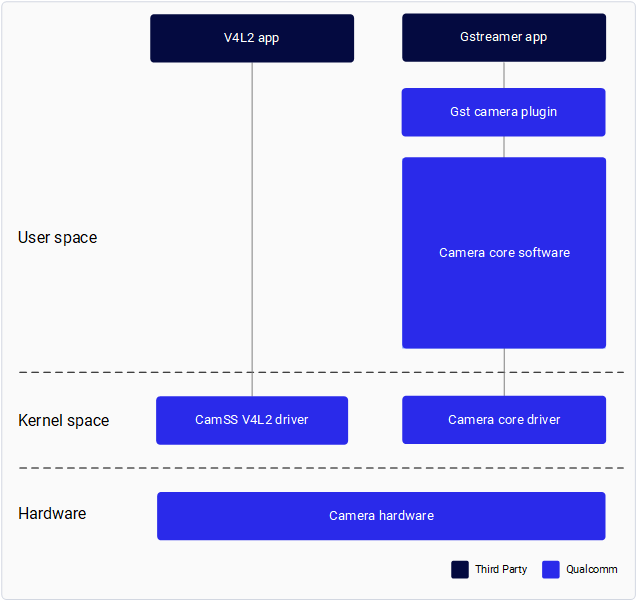
下图显示了 Qualcomm Camera 的组件。
以下组件由 Qualcomm 提供:
| **组件** | **描述** |
| :------------------: | :--------------------------------------------: |
| Gst 相机插件(qtiqmmfsrc) | 用于 Qualcomm 相机子系统的 GStreamer 插件 |
| Camera Core Software | Qualcomm 专有的相机软件,提供开发相机传感器驱动程序、相机调优和自定义软件节点的接口 |
| Camera Core Driver | 下游 Linux 内核中的 Qualcomm 相机子系统驱动程序 |
| CamSS V4L2 driver | 上游 Linux 内核中的 Qualcomm 相机子系统驱动程序 |
Qualcomm 提供了一个 GStreamer 插件,使应用程序开发人员能够与 Qualcomm 相机子系统对接。有关应用程序开发,请参见 [GStreamer API](./stream-cameras#03-·-stream-camera-with-the-gstreamer-api)。
Qualcomm 为相机传感器驱动程序开发人员和 IQ 调优工程师提供了接口,以开发自己的传感器驱动程序并执行自定义 IQ 调优。请参见相机补充文档中的 [相机传感器驱动程序开发与调优](./camera-addendum-overview#develop-sensor-drivers)。
进行相机传感器驱动程序开发和自定义 IQ 调优需要具有 meta- qcom-extras 层的访问权限。有关访问级别,请参考 [访问级别映射](https://dragonwingdocs.qualcomm.com/Key-Documents/Firmware-Guide/build-firmware)。
## **前提条件**
* 按照 [Qualcomm Linux 构建指南](https://dragonwingdocs.qualcomm.com/Key-Documents/Yocto-Guide/qualcomm-linux-yocto-overview) 中的说明设置基础环境
* 将最新的软件版本刷写到开发板
* 设置 SSH 连接:
> 1. 按照 [使用 SSH](https://dragonwingdocs.qualcomm.com/Linux/devices/iq9075-evk/set-up-the-device#connect-over-ssh) 中提到的步骤在 Permissive 模式下启用 SSH。
> 2. 运行以下命令连接到设备:
> ```text theme={null}
> ssh root@
> ```
> 例如,如果设备的 IP 地址为 10.92.160.222,请运行以下命令:
> ```text theme={null}
> ssh root@10.92.160.222
> ```
* 我们建议使用 Qualcomm Launcher 工具进行构建刷写,因为它会在内部处理所有必需的配置。请参考 [Qualcomm Launcher - 刷写步骤](https://dragonwingdocs.qualcomm.com/Tools/Qualcomm-Launcher/flash-os#flashing-steps)。
如果使用其他刷写方法,请注意以下事项:
* 下游相机驱动程序默认未启用。
* 您必须按照 [Qualcomm Linux 迁移指南](https://dragonwingdocs.qualcomm.com/Key-Documents/Migration-Guide/migrate-features-to-qualcomm-linux-2-0#enable-camera-functionality) 中的相机 overlay 配置步骤显式启用它。
**警告:**
上游和下游 Qualcomm 相机子系统驱动程序是互斥的。
每个系统配置只能启用其中一种实现。
同时启用两者不受支持,并且可能导致驱动程序冲突或未定义行为。