> ## Documentation Index
> Fetch the complete documentation index at: https://dragonwingdocs-staging.qualcomm.com/llms.txt
> Use this file to discover all available pages before exploring further.
# 启用 SELinux
在 qcom-distro-catchall 发行版中,SELinux 默认启用并运行在 Enforcing 模式下。
启用 SELinux 后,所有系统对象(包括文件、目录、进程、套接字、驱动程序等)都会被标记安全上下文。
安全上下文由用户、角色、类型标识符和可选的敏感度组成,以冒号分隔。
例如:`user:role:type:sensitivity`
**注意**
*User* 与 Linux 用户无关,*Type* 与对象本身的种类无关。
* 有效的用户、角色和类型集合在策略中定义。
* 不同的对象会被标记相同的安全上下文。
* SELinux 安全策略的 MAC 机制通过以下方式实现:
* 类型强制(TE)
* 基于角色的访问控制(RBAC)
* Refpolicy Targeted
* 类型使策略能够指定允许的操作。
**图:SELinux 流程**
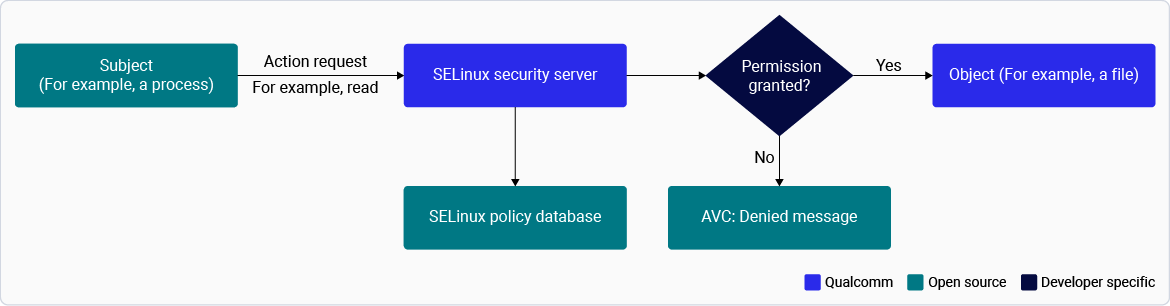 以下过程说明如何验证和启用 SELinux 以及修改 SELinux 模式。
**注意**
默认情况下,**SELinux 已启用**并配置为 Enforcing 模式,以提供强制访问控制并强化平台安全性。在开发和调试期间,可以将 SELinux 临时切换到 Permissive 模式,以在不强制执行访问限制的情况下记录策略违规。对于生产和商用部署,Qualcomm 建议将 SELinux 保持在 Enforcing 模式
## **验证并修改 SELinux 模式**
如果启用了 SELinux,您可能无法更新防回滚保护标志。
1. 检查设备当前的 SELinux 配置(Enforcing 或 Permissive 模式):
```text theme={null}
getenforce
```
2. 如果设置为 Enforcing 模式,请运行 `setenforce` 命令更改模式。
1. 使用 SSH 连接到设备。
2. 使用以下命令更改 SELinux 模式。
* 将设备切换到 Enforcing 模式:
```text theme={null}
setenforce 1
```
* 将设备切换到 Permissive 模式:
```text theme={null}
setenforce 0
```
* 重新检查设备的当前配置(Enforcing 或 Permissive 模式):
```text theme={null}
getenforce
```
## **在 SELinux 构建上启用 SSH**
默认情况下,在 selinux enforcing 模式下 ssh 登录受到限制。
仅出于开发和调试目的才允许启用 SSH 登录。
启用 SSH 登录的方法:
1. 构建时启用:
* 在现有 refpolicy 基础上创建补丁,在 [refpolicy/policy/modules/services/ssh.te](https://github.com/SELinuxProject/refpolicy/blob/main/policy/modules/services/ssh.te#L20) 中添加 `gen_tunable(ssh_sysadm_login, true)`
* 请参阅[自定义安全服务](./customize-security-services.mdx)将补丁添加到现有工作区。
* 构建 selinux distro 并刷写到设备。
* 登录 SSH
2. 运行时启用
* 登录串行控制台
* 运行以下命令:
```text theme={null}
setsebool -P ssh_sysadm_login true
```
* 登录 SSH
## **配置 SELinux(启用、禁用和切换模式)**
要切换到 Enforcing 模式(限制性)或 Permissive 模式(非限制性但会记录日志),请按照以下步骤操作:
1. 启用或禁用 SELinux:
* 要在构建中禁用 SELinux,请在 SELinux distro 配置文件中将 `DEFAULT_ENFORCING` 设置为 `disabled`:
```text theme={null}
meta-qcom-distro/conf/distro/include/qcom-distro-selinux.inc
DEFAULT_ENFORCING ?= "disabled"
```
* 要启用 SELinux,请将 `DEFAULT_ENFORCING` 设置为 `enforcing`(默认设置)。
* 使用策略版本 35。
* 要为 SELinux 添加策略,请参阅上游 [refpolicy](https://github.com/SELinuxProject/refpolicy)。
2. 在目标设备上使用 `getenforce` 检查系统状态。该命令会返回以下三个值之一:
* Enforcing
* Permissive
* Disabled
3. 要更改模式,请在运行时通过运行带数字的 `setenforce` 选择模式(此更改在重启后不会保留)。
| **命令** | **结果** |
| :------------: | :---------------: |
| `setenforce 1` | 切换到 Enforcing 模式 |
| `setenforce 0` | 切换到 Permissive 模式 |
1. 要在重启后保持设置:
1. 使用 SSH 连接到设备。有关说明,请参阅 [Qualcomm Linux Build Guide](https://docs.qualcomm.com/bundle/publicresource/topics/80-80021-254/how_to.html#use-ssh)。
2. 在 `/etc/selinux/config` 中将 SELINUX= 编辑为三个受支持的值之一:`enforcing`、`permissive` 或 `disabled`。
3. 使用以下命令重启设备:
> ```text theme={null}
> reboot
> ```
2. 要在构建中指定 SELinux 模式:将 `DEFAULT_ENFORCING` 构建标志更改为三个受支持的值之一:enforcing、permissive 或 disabled。
```text theme={null}
meta-qcom-distro/conf/distro/include/qcom-distro-selinux.inc
-- DEFAULT_ENFORCING = "permissive"
++ DEFAULT_ENFORCING = "enforcing"
```
4. SELinux Disabled 模式会留下许多经过 SELinux 框架的代码路径。这些代码路径对于 KPI 测试或验证 SELinux 框架中的缺陷没有用处。它也不会比 Permissive 模式允许更多的访问。
要在测试时禁用该功能,请从 `DISTRO_FEATURES` 中移除 SELinux:
```text theme={null}
meta-qcom-distro/conf/distro/include/qcom-distro-selinux.inc
-- DISTRO_FEATURES:append = " selinux"
```
## **后续步骤**
* 要确保在启动过程中仅加载经过验证和受信任的应用程序,请参阅[启用 UEFI 安全引导](./enable-uefi-secure-boot)。
* 有关芯片组功能管理以及升级芯片组功能包,请参阅[安装或升级 SoftSKU 功能包](./install-or-upgrade-the-soft-sku-feature-packs)。
以下过程说明如何验证和启用 SELinux 以及修改 SELinux 模式。
**注意**
默认情况下,**SELinux 已启用**并配置为 Enforcing 模式,以提供强制访问控制并强化平台安全性。在开发和调试期间,可以将 SELinux 临时切换到 Permissive 模式,以在不强制执行访问限制的情况下记录策略违规。对于生产和商用部署,Qualcomm 建议将 SELinux 保持在 Enforcing 模式
## **验证并修改 SELinux 模式**
如果启用了 SELinux,您可能无法更新防回滚保护标志。
1. 检查设备当前的 SELinux 配置(Enforcing 或 Permissive 模式):
```text theme={null}
getenforce
```
2. 如果设置为 Enforcing 模式,请运行 `setenforce` 命令更改模式。
1. 使用 SSH 连接到设备。
2. 使用以下命令更改 SELinux 模式。
* 将设备切换到 Enforcing 模式:
```text theme={null}
setenforce 1
```
* 将设备切换到 Permissive 模式:
```text theme={null}
setenforce 0
```
* 重新检查设备的当前配置(Enforcing 或 Permissive 模式):
```text theme={null}
getenforce
```
## **在 SELinux 构建上启用 SSH**
默认情况下,在 selinux enforcing 模式下 ssh 登录受到限制。
仅出于开发和调试目的才允许启用 SSH 登录。
启用 SSH 登录的方法:
1. 构建时启用:
* 在现有 refpolicy 基础上创建补丁,在 [refpolicy/policy/modules/services/ssh.te](https://github.com/SELinuxProject/refpolicy/blob/main/policy/modules/services/ssh.te#L20) 中添加 `gen_tunable(ssh_sysadm_login, true)`
* 请参阅[自定义安全服务](./customize-security-services.mdx)将补丁添加到现有工作区。
* 构建 selinux distro 并刷写到设备。
* 登录 SSH
2. 运行时启用
* 登录串行控制台
* 运行以下命令:
```text theme={null}
setsebool -P ssh_sysadm_login true
```
* 登录 SSH
## **配置 SELinux(启用、禁用和切换模式)**
要切换到 Enforcing 模式(限制性)或 Permissive 模式(非限制性但会记录日志),请按照以下步骤操作:
1. 启用或禁用 SELinux:
* 要在构建中禁用 SELinux,请在 SELinux distro 配置文件中将 `DEFAULT_ENFORCING` 设置为 `disabled`:
```text theme={null}
meta-qcom-distro/conf/distro/include/qcom-distro-selinux.inc
DEFAULT_ENFORCING ?= "disabled"
```
* 要启用 SELinux,请将 `DEFAULT_ENFORCING` 设置为 `enforcing`(默认设置)。
* 使用策略版本 35。
* 要为 SELinux 添加策略,请参阅上游 [refpolicy](https://github.com/SELinuxProject/refpolicy)。
2. 在目标设备上使用 `getenforce` 检查系统状态。该命令会返回以下三个值之一:
* Enforcing
* Permissive
* Disabled
3. 要更改模式,请在运行时通过运行带数字的 `setenforce` 选择模式(此更改在重启后不会保留)。
| **命令** | **结果** |
| :------------: | :---------------: |
| `setenforce 1` | 切换到 Enforcing 模式 |
| `setenforce 0` | 切换到 Permissive 模式 |
1. 要在重启后保持设置:
1. 使用 SSH 连接到设备。有关说明,请参阅 [Qualcomm Linux Build Guide](https://docs.qualcomm.com/bundle/publicresource/topics/80-80021-254/how_to.html#use-ssh)。
2. 在 `/etc/selinux/config` 中将 SELINUX= 编辑为三个受支持的值之一:`enforcing`、`permissive` 或 `disabled`。
3. 使用以下命令重启设备:
> ```text theme={null}
> reboot
> ```
2. 要在构建中指定 SELinux 模式:将 `DEFAULT_ENFORCING` 构建标志更改为三个受支持的值之一:enforcing、permissive 或 disabled。
```text theme={null}
meta-qcom-distro/conf/distro/include/qcom-distro-selinux.inc
-- DEFAULT_ENFORCING = "permissive"
++ DEFAULT_ENFORCING = "enforcing"
```
4. SELinux Disabled 模式会留下许多经过 SELinux 框架的代码路径。这些代码路径对于 KPI 测试或验证 SELinux 框架中的缺陷没有用处。它也不会比 Permissive 模式允许更多的访问。
要在测试时禁用该功能,请从 `DISTRO_FEATURES` 中移除 SELinux:
```text theme={null}
meta-qcom-distro/conf/distro/include/qcom-distro-selinux.inc
-- DISTRO_FEATURES:append = " selinux"
```
## **后续步骤**
* 要确保在启动过程中仅加载经过验证和受信任的应用程序,请参阅[启用 UEFI 安全引导](./enable-uefi-secure-boot)。
* 有关芯片组功能管理以及升级芯片组功能包,请参阅[安装或升级 SoftSKU 功能包](./install-or-upgrade-the-soft-sku-feature-packs)。