> ## Documentation Index
> Fetch the complete documentation index at: https://dragonwingdocs-staging.qualcomm.com/llms.txt
> Use this file to discover all available pages before exploring further.
# DIP 开关、端口与接口
## 端口与接口
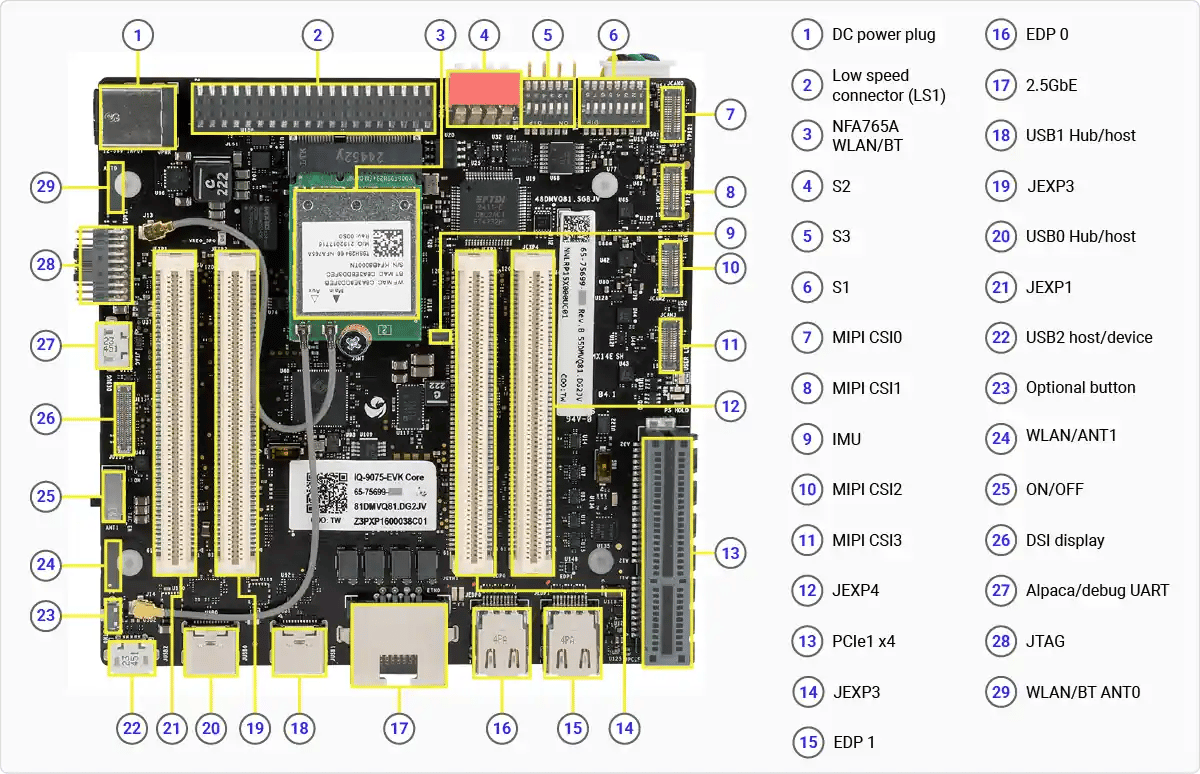 ## DIP 开关
以下图片显示了主板上 DIP 开关的位置。
## DIP 开关
以下图片显示了主板上 DIP 开关的位置。
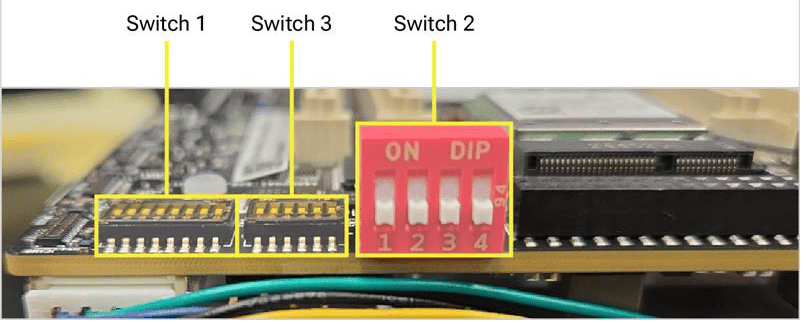
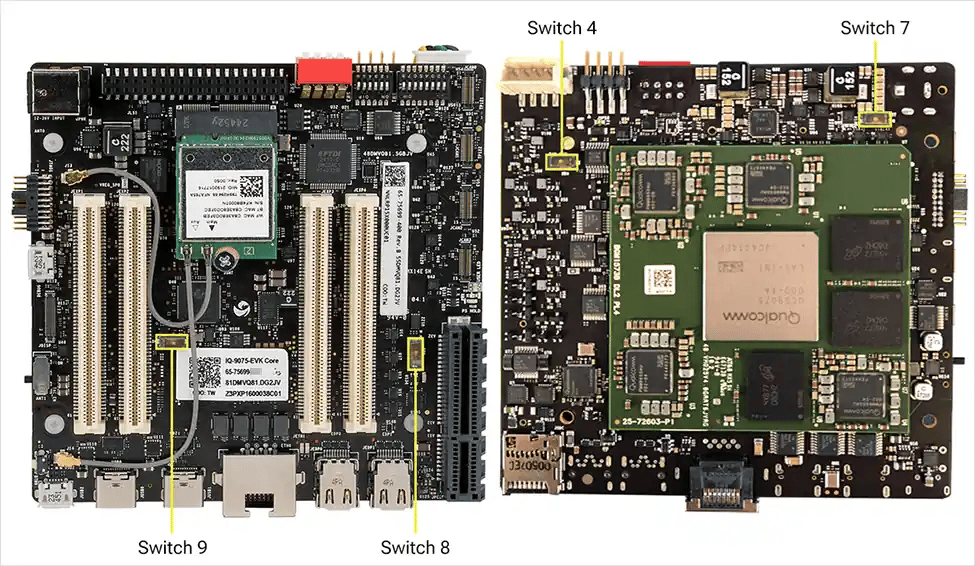 主板上的所有功能在不更改任何 DIP 开关的情况下均可运行。大的红色开关用于 EDL/Fastboot;下方较小的开关用于 Mezzanine 扩展板。
| 开关 | ON 时的连接 | OFF 时的连接(出厂默认) |
| - | - | - |
| SW1-1 | PCIe0 路由到 mezzanine | PCIe0 连接到主板 Wi-Fi 模块 |
| SW1-2 | PCIe1 路由到 mezzanine | PCIe1 连接到主板 PCIe 连接器 |
| SW1-3 | SDIO 路由到 mezzanine | SDIO 路由到主板 SD 卡 |
| SW1-4 | DSI 路由到主板排线连接器 | DSI 路由到 mezzanine |
| SW1-5 | CSI0 路由到 mezzanine | CSI0 路由到主板 CSI 排线连接器 |
| SW1-6 | CSI1 路由到 mezzanine | CSI1 路由到主板 CSI 排线连接器 |
| SW1-7 | CSI2 路由到 mezzanine | CSI2 路由到主板 CSI 排线连接器 |
| SW1-8 | CSI3 路由到 mezzanine | CSI3 路由到主板 CSI 排线连接器 |
| SW2-1 | Main 域强制 USB 启动/EDL | 无影响 |
| SW2-2 | Main 域 fast boot | 无影响 |
| SW2-3 | Main 域和 Sail 域强制 USB 启动/EDL(组合) | 无影响 |
| SW2-4 | Sail 域 Fastboot 模式 | 无影响 |
| SW3-1 | OSPI 路由到 mezzanine | OSPI 连接到 MCU 的板载存储器 |
| SW3-2 | 强制 MD 和 MCU PS\_HOLD | 无影响 |
| SW3-3 | 看门狗禁用 | 启用 RAM dump |
| SW3-4 | 从 eMMC 启动(位于接口和 mezzanine 上) | 从 UFS 启动 |
| SW3-5 | 启用 EUD | 无影响 |
| SW3-6 | 跳过 MD BIST | 无影响 |
| SW4-1 | 风扇的 PWM-MODE 设置为低 | 风扇的 PWM-MODE 设置为高 |
| SW7-1 | RGMII 电压选择 2.5V | RGMII 电压选择 1.8V |
| SW8-1 | USB 连接到 mezzanine 上 NFA765 模块的 M.2 连接器 | USB 连接到主板上 NFA765 模块的 M.2 连接器 |
| SW9-1 | SAIL CAN GPIO 路由到 mezzanine | SAIL CAN GPIO 路由到 JLS1 连接器 |
**SW2-1** 未在软件中启用。**SW2-3** 使两个域同时进入 EDL 模式 — 软件下载时需要。
## 其他按钮和开关
* **侧面安装的滑动/拨动开关**(位置 25)是**主电源开关**。要对设备重新上电或复位,拨动该开关即可 — 无需按下或长按按钮。
* 一个**小按钮**(位置 26)目前**未启用**。它连接到 **GPIO 6**,保留供未来的软件功能使用。
主板上的所有功能在不更改任何 DIP 开关的情况下均可运行。大的红色开关用于 EDL/Fastboot;下方较小的开关用于 Mezzanine 扩展板。
| 开关 | ON 时的连接 | OFF 时的连接(出厂默认) |
| - | - | - |
| SW1-1 | PCIe0 路由到 mezzanine | PCIe0 连接到主板 Wi-Fi 模块 |
| SW1-2 | PCIe1 路由到 mezzanine | PCIe1 连接到主板 PCIe 连接器 |
| SW1-3 | SDIO 路由到 mezzanine | SDIO 路由到主板 SD 卡 |
| SW1-4 | DSI 路由到主板排线连接器 | DSI 路由到 mezzanine |
| SW1-5 | CSI0 路由到 mezzanine | CSI0 路由到主板 CSI 排线连接器 |
| SW1-6 | CSI1 路由到 mezzanine | CSI1 路由到主板 CSI 排线连接器 |
| SW1-7 | CSI2 路由到 mezzanine | CSI2 路由到主板 CSI 排线连接器 |
| SW1-8 | CSI3 路由到 mezzanine | CSI3 路由到主板 CSI 排线连接器 |
| SW2-1 | Main 域强制 USB 启动/EDL | 无影响 |
| SW2-2 | Main 域 fast boot | 无影响 |
| SW2-3 | Main 域和 Sail 域强制 USB 启动/EDL(组合) | 无影响 |
| SW2-4 | Sail 域 Fastboot 模式 | 无影响 |
| SW3-1 | OSPI 路由到 mezzanine | OSPI 连接到 MCU 的板载存储器 |
| SW3-2 | 强制 MD 和 MCU PS\_HOLD | 无影响 |
| SW3-3 | 看门狗禁用 | 启用 RAM dump |
| SW3-4 | 从 eMMC 启动(位于接口和 mezzanine 上) | 从 UFS 启动 |
| SW3-5 | 启用 EUD | 无影响 |
| SW3-6 | 跳过 MD BIST | 无影响 |
| SW4-1 | 风扇的 PWM-MODE 设置为低 | 风扇的 PWM-MODE 设置为高 |
| SW7-1 | RGMII 电压选择 2.5V | RGMII 电压选择 1.8V |
| SW8-1 | USB 连接到 mezzanine 上 NFA765 模块的 M.2 连接器 | USB 连接到主板上 NFA765 模块的 M.2 连接器 |
| SW9-1 | SAIL CAN GPIO 路由到 mezzanine | SAIL CAN GPIO 路由到 JLS1 连接器 |
**SW2-1** 未在软件中启用。**SW2-3** 使两个域同时进入 EDL 模式 — 软件下载时需要。
## 其他按钮和开关
* **侧面安装的滑动/拨动开关**(位置 25)是**主电源开关**。要对设备重新上电或复位,拨动该开关即可 — 无需按下或长按按钮。
* 一个**小按钮**(位置 26)目前**未启用**。它连接到 **GPIO 6**,保留供未来的软件功能使用。