> ## Documentation Index
> Fetch the complete documentation index at: https://dragonwingdocs-staging.qualcomm.com/llms.txt
> Use this file to discover all available pages before exploring further.
# 对 LiteRT 模型进行基准测试
> 使用 benchmark_model 工具在 Qualcomm Dragonwing 物联网平台的 CPU、GPU 和 NPU 上对 LiteRT 模型性能进行基准测试。
LiteRT 开源框架提供了 `benchmark_model` 工具,用于测量模型通过 delegate 在硬件上的执行性能。此工具与其他 LiteRT 构件一起安装在目标设备上。
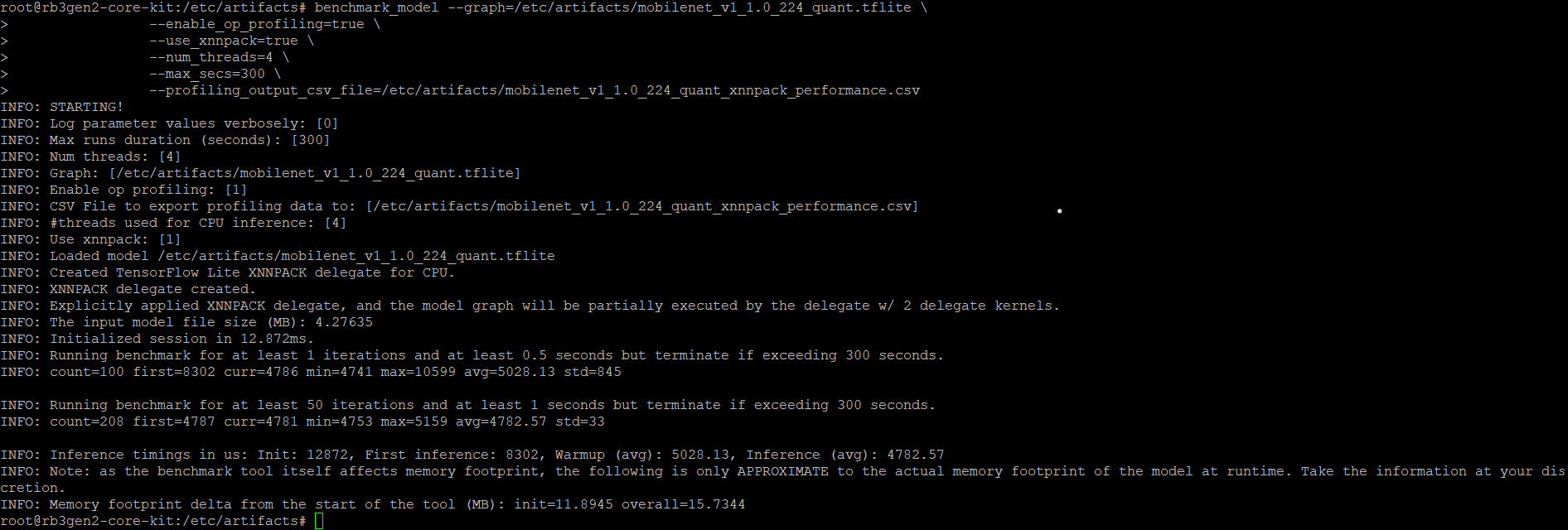
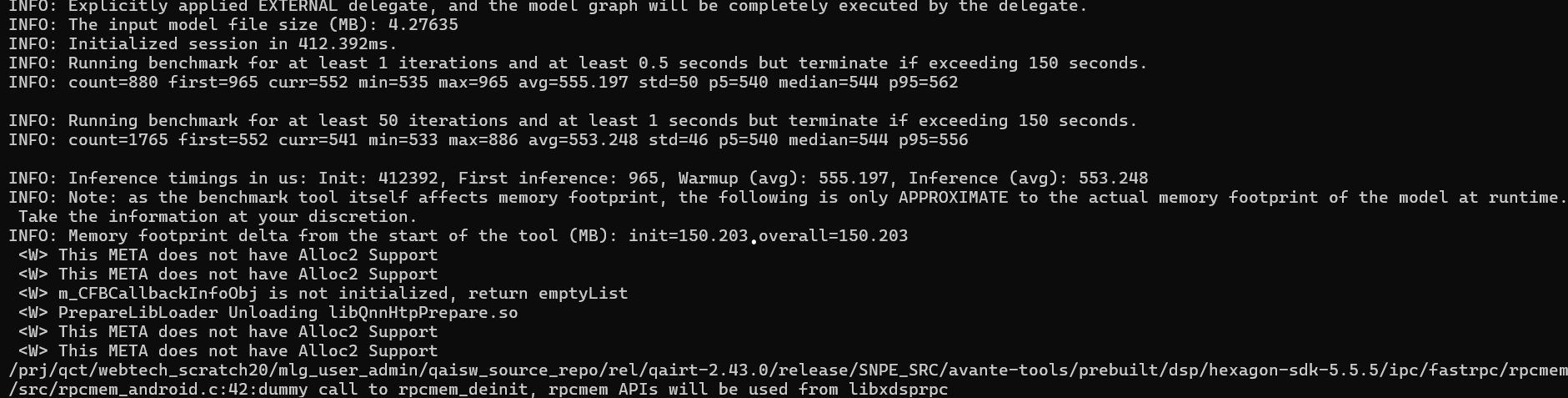
该工具测量并报告以下性能指标:
* 初始化时间
* 推理时间 (预热和稳态)
* 初始化期间的内存使用量
* 总体内存使用量
## 前提条件
在运行基准测试之前,请确保您具备以下条件:
* Ubuntu 22.04 主机
* Qualcomm 开发套件
### 设置模型文件
* [BMP 测试图像](https://github.com/sourcecode369/tensorflow-1/tree/master/tensorflow/lite/examples/label_image/testdata/grace_hopper.bmp)
* [MobileNet LiteRT 模型](https://github.com/emgucv/models/blob/master/mobilenet_v1_1.0_224_float_2017_11_08/mobilenet_v1_1.0_224.tflite)
在主机上:
```shell theme={null}
wget http://download.tensorflow.org/models/mobilenet_v1_2018_08_02/mobilenet_v1_1.0_224_quant.tgz
```
```shell theme={null}
tar -xvf mobilenet_v1_1.0_224_quant.tgz
```
```shell theme={null}
wget https://storage.googleapis.com/download.tensorflow.org/models/mobilenet_v1_1.0_224_frozen.tgz
```
```shell theme={null}
tar -xvf mobilenet_v1_1.0_224_frozen.tgz
```
```shell theme={null}
ssh root@
```
```shell theme={null}
mount -o remount,rw /usr
```
```shell theme={null}
mkdir -p ${HOME}/artifacts
```
```shell theme={null}
exit
```
```shell theme={null}
scp mobilenet_v1_1.0_224_quant.tflite grace_hopper.bmp mobilenet_v1_1.0_224/labels.txt mobilenet_v1_1.0_224.tflite root@:~/artifacts
```
```shell theme={null}
export OCL_ICD_FILENAMES=/usr/lib/libOpenCL_adreno.so.1
```
```shell theme={null}
ln -sf /usr/lib/libOpenCL.so.1 /usr/lib/libOpenCL.so
```
示例应用程序使用 MobileNet v1 模型作为示例分类模型,该模型在包含 1000 个类别的 ImageNet 数据集上训练。
## 在 CPU 上进行基准测试
`label_image` 示例应用程序已与 LiteRT 库交叉编译并安装在目标设备上。源代码可在 [TensorFlow GitHub 仓库](https://github.com/tensorflow/tensorflow/tree/master/tensorflow/lite/examples/label_image)获取。
要在 CPU 上使用 XNNPACK delegate 进行基准测试:
```shell theme={null}
ssh root@
```
```shell theme={null}
cd ${HOME}/artifacts
```
```shell theme={null}
benchmark_model --graph=${HOME}/artifacts/mobilenet_v1_1.0_224_quant.tflite \
--enable_op_profiling=true \
--use_xnnpack=true \
--num_threads=4 \
--max_secs=300 \
--profiling_output_csv_file=${HOME}/artifacts/mobilenet_v1_1.0_224_quant_xnnpack_performance.csv
```
 ## 在 GPU 上进行基准测试
要使用 GPU delegate 进行基准测试:
```shell theme={null}
ssh root@
```
```shell theme={null}
cd ${HOME}/artifacts
```
```shell theme={null}
benchmark_model --graph=${HOME}/artifacts/mobilenet_v1_1.0_224_quant.tflite \
--enable_op_profiling=true \
--use_gpu=true \
--num_runs=100 \
--warmup_runs=10 \
--max_secs=300 \
--profiling_output_csv_file=${HOME}/artifacts/mobilenet_v1_1.0_224_GPU_Delegate_performance.csv
```
## 在 GPU 上进行基准测试
要使用 GPU delegate 进行基准测试:
```shell theme={null}
ssh root@
```
```shell theme={null}
cd ${HOME}/artifacts
```
```shell theme={null}
benchmark_model --graph=${HOME}/artifacts/mobilenet_v1_1.0_224_quant.tflite \
--enable_op_profiling=true \
--use_gpu=true \
--num_runs=100 \
--warmup_runs=10 \
--max_secs=300 \
--profiling_output_csv_file=${HOME}/artifacts/mobilenet_v1_1.0_224_GPU_Delegate_performance.csv
```
 ## 使用 QAIRT delegate 在 NPU 上进行基准测试
Qualcomm AI Runtime delegate 使用 Qualcomm AI Runtime API 及其后端,在 Adreno GPU 和 Hexagon Tensor Processor 上加速模型。
要使用 QAIRT 外部 delegate,请确保设备上有以下库:
* `libQnnTFLiteDelegate.so` — QNN delegate 库
* 来自 Qualcomm AI Engine Direct SDK 的库
您可以通过外部 delegate 选项自定义模型执行以使用特定后端:
* `libQnnGpu.so` — 在 GPU 上运行 QNN delegate
* `libQnnHtp.so` — 在 Hexagon Tensor Processor 上运行 QNN delegate
* `libQnnDsp.so` — 在 DSP 上运行 QNN delegate
要使用 QNN 外部 delegate 在 Hexagon Tensor Processor 上进行基准测试:
```shell theme={null}
benchmark_model --graph=${HOME}/artifacts/mobilenet_v1_1.0_224_quant.tflite \
--external_delegate_path=/usr/lib/libQnnTFLiteDelegate.so \
--external_delegate_options='backend_type:htp;library_path:/usr/lib/libQnnHtp.so;skel_library_dir:/usr/lib/rfsa/adsp;htp_precision:0;htp_performance_mode:2'
```
```shell theme={null}
benchmark_model --graph=${HOME}/mobilenet_v1_1.0_224_quant.tflite \
--external_delegate_path=libQnnTFLiteDelegate.so \
--external_delegate_options='backend_type:dsp;library_path:/usr/lib/libQnnDsp.so;skel_library_dir:/usr/lib/dsp/adsp'
```
基准测试目前在 IQ-615 上会失败。
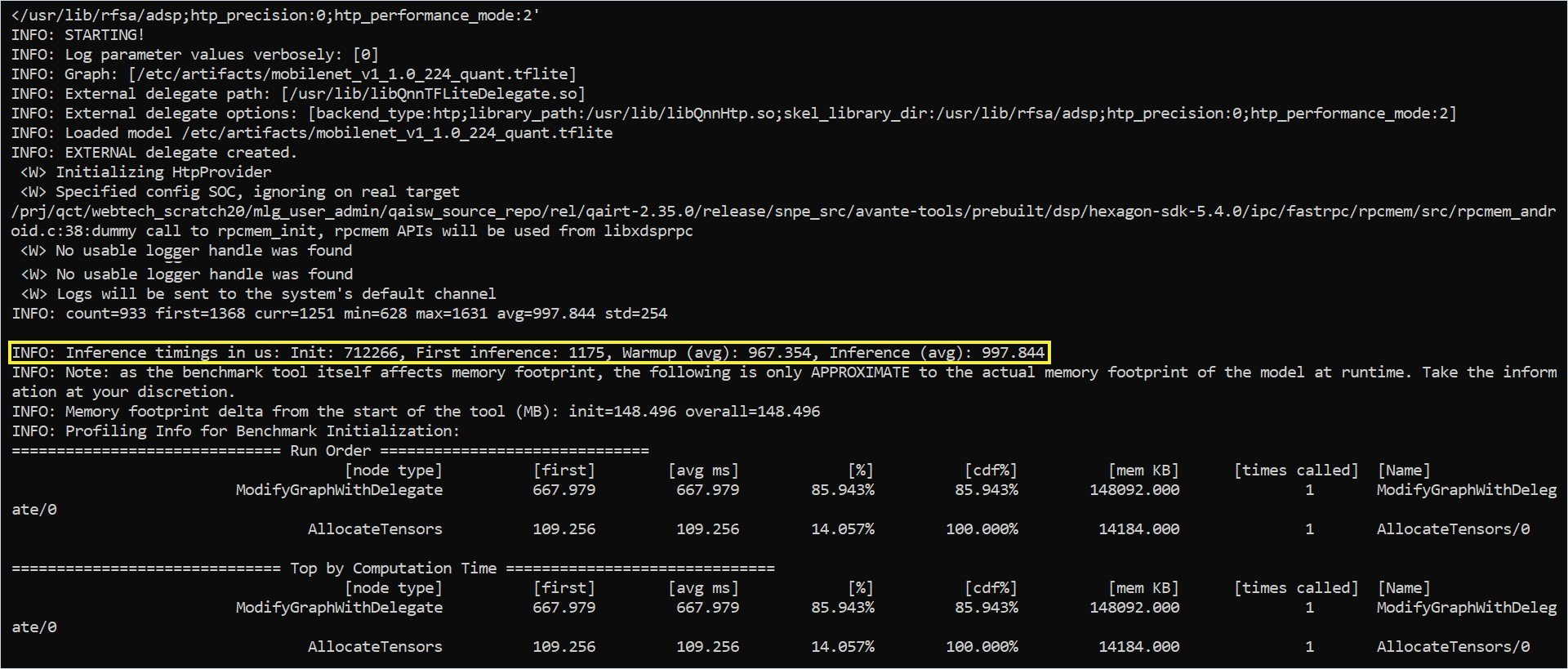
基准测试输出包括以下统计信息:
* Delegate 创建状态
* 使用 delegate 在硬件上的平均推理时间
* 模型执行的内存占用
## 使用 QAIRT delegate 在 NPU 上进行基准测试
Qualcomm AI Runtime delegate 使用 Qualcomm AI Runtime API 及其后端,在 Adreno GPU 和 Hexagon Tensor Processor 上加速模型。
要使用 QAIRT 外部 delegate,请确保设备上有以下库:
* `libQnnTFLiteDelegate.so` — QNN delegate 库
* 来自 Qualcomm AI Engine Direct SDK 的库
您可以通过外部 delegate 选项自定义模型执行以使用特定后端:
* `libQnnGpu.so` — 在 GPU 上运行 QNN delegate
* `libQnnHtp.so` — 在 Hexagon Tensor Processor 上运行 QNN delegate
* `libQnnDsp.so` — 在 DSP 上运行 QNN delegate
要使用 QNN 外部 delegate 在 Hexagon Tensor Processor 上进行基准测试:
```shell theme={null}
benchmark_model --graph=${HOME}/artifacts/mobilenet_v1_1.0_224_quant.tflite \
--external_delegate_path=/usr/lib/libQnnTFLiteDelegate.so \
--external_delegate_options='backend_type:htp;library_path:/usr/lib/libQnnHtp.so;skel_library_dir:/usr/lib/rfsa/adsp;htp_precision:0;htp_performance_mode:2'
```
```shell theme={null}
benchmark_model --graph=${HOME}/mobilenet_v1_1.0_224_quant.tflite \
--external_delegate_path=libQnnTFLiteDelegate.so \
--external_delegate_options='backend_type:dsp;library_path:/usr/lib/libQnnDsp.so;skel_library_dir:/usr/lib/dsp/adsp'
```
基准测试目前在 IQ-615 上会失败。
基准测试输出包括以下统计信息:
* Delegate 创建状态
* 使用 delegate 在硬件上的平均推理时间
* 模型执行的内存占用