> ## Documentation Index
> Fetch the complete documentation index at: https://dragonwingdocs-staging.qualcomm.com/llms.txt
> Use this file to discover all available pages before exploring further.
# Display
The IQ-8275 platform features a Qualcomm Adreno Display Processing Unit (DPU) providing hardware-accelerated image processing. The IQ8-EVK supports two simultaneous displays via dual DisplayPort outputs.
## Display Capabilities
| Interface | Capability |
| - | - |
| **DP0** | 3840 × 2160 at 60 fps, 30 bpp |
| **DP1** | 3840 × 2160 at 60 fps, 30 bpp |
| **Concurrent** | DP0 as primary + DP1 as secondary, both at 3840 × 2160 @ 60 fps |
**Supported features:**
* Wayland and Weston with upstream protocol
* Weston compositor with DRM backend
* 2× DisplayPort with SST and MST support
## Architecture
### DPU Hardware
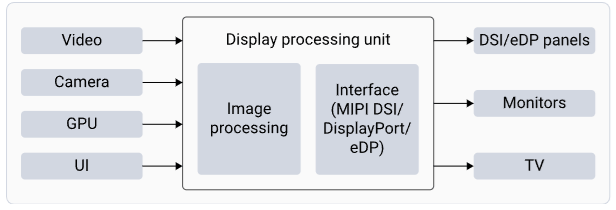
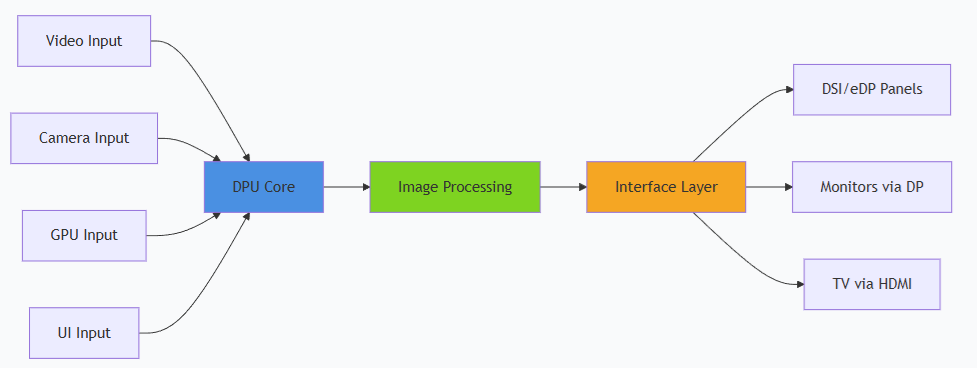
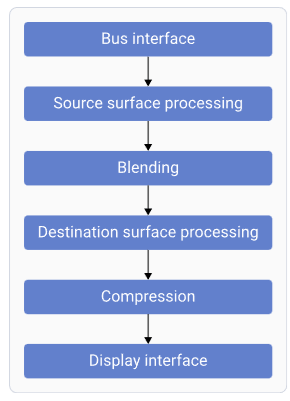 | Component | Function |
| - | - |
| **Bus Interface** | Fetches data from memory |
| **Source Surface Processing** | Reads RGB/YUV surfaces; performs format conversion |
| **Blending** | Blends and mixes source surfaces |
| **Destination Surface Processing** | Converts and adjusts data for panel characteristics |
| **Compression** | Reduces bandwidth by sending compressed display buffers |
| **Display Interface** | Generates timings for connected display peripherals |
### Software Stack
| Component | Function |
| - | - |
| **Bus Interface** | Fetches data from memory |
| **Source Surface Processing** | Reads RGB/YUV surfaces; performs format conversion |
| **Blending** | Blends and mixes source surfaces |
| **Destination Surface Processing** | Converts and adjusts data for panel characteristics |
| **Compression** | Reduces bandwidth by sending compressed display buffers |
| **Display Interface** | Generates timings for connected display peripherals |
### Software Stack
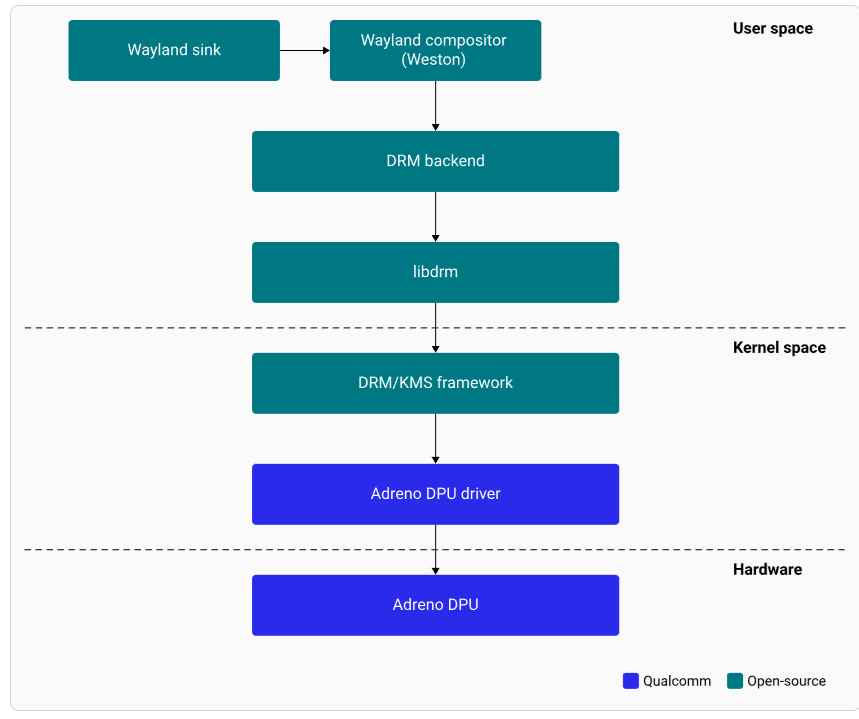
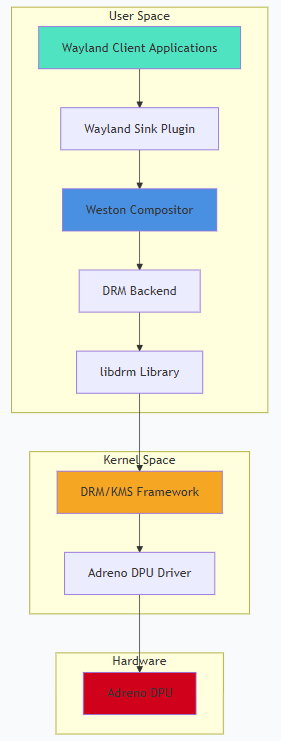 | Component | Description |
| - | - |
| **Wayland Sink** | Plug-in communicating with Weston to render the display |
| **Weston** | Wayland compositor; handles composition and rendering |
| **DRM Backend** | Manages Adreno DPU hardware resources and composition strategy |
| **libdrm** | Library providing DRM IOCTL APIs |
| **Adreno DPU Driver** | Manages all pixel data paths to panel interfaces |
## Setup
Connect a DisplayPort cable to the **eDP0** connector.
For dual display, connect a second DisplayPort cable to **eDP1**.
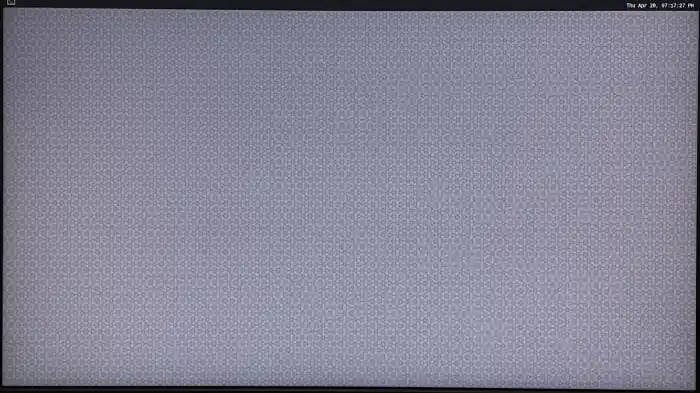
Power on the device. Weston launches automatically during boot and displays the flower pattern.
| Component | Description |
| - | - |
| **Wayland Sink** | Plug-in communicating with Weston to render the display |
| **Weston** | Wayland compositor; handles composition and rendering |
| **DRM Backend** | Manages Adreno DPU hardware resources and composition strategy |
| **libdrm** | Library providing DRM IOCTL APIs |
| **Adreno DPU Driver** | Manages all pixel data paths to panel interfaces |
## Setup
Connect a DisplayPort cable to the **eDP0** connector.
For dual display, connect a second DisplayPort cable to **eDP1**.
Power on the device. Weston launches automatically during boot and displays the flower pattern.
 ### SSH Access
Default credentials: **Username:** `ubuntu` / **Password:** `ubuntu`
## Testing and Verification
### Run Weston EGL Client
```bash theme={null}
weston-simple-egl
```
**Expected output:** A rotating triangle on the display at 60 fps. Press `Ctrl+C` to terminate.
### GStreamer Video Playback
```bash theme={null}
# H.264 playback
gst-launch-1.0 -v filesrc location=/etc/media/video.mp4 ! qtdemux ! queue ! \
h264parse ! v4l2h264dec capture-io-mode=4 output-io-mode=4 ! \
video/x-raw,format=NV12 ! waylandsink
# H.265/HEVC playback
gst-launch-1.0 -v filesrc location=/etc/media/video_hevc.mp4 ! qtdemux ! queue ! \
h265parse ! v4l2h265dec capture-io-mode=4 output-io-mode=4 ! \
video/x-raw,format=NV12 ! waylandsink
```
## Debugging
```bash theme={null}
sudo cat /sys/class/drm/card0-DP-1/status # eDP0 cable status
sudo cat /sys/class/drm/card0-DP-2/status # eDP1 cable status
sudo cat /sys/class/drm/card0-DP-1/modes # Available EDID modes
dmesg | grep -i "dp\|display\|drm"
```
## Troubleshooting
```bash theme={null}
cat /sys/class/drm/card0-DP-1/status
sudo dmesg | grep -i "dp\|display\|drm"
```
* Verify cable connection to eDP0 or eDP1
* Check display power and input source selection
```bash theme={null}
journalctl -u weston
ls -l /dev/dri/card0
weston --idle-time=0 --continue-without-input --log=/home/ubuntu/weston.log
```
```bash theme={null}
cat /sys/class/drm/card0-DP-1/status
cat /sys/class/drm/card0-DP-2/status
cat /sys/kernel/debug/dri/0/state
```
```bash theme={null}
killall weston
sudo systemctl start weston-autostart
export XDG_RUNTIME_DIR=/run/user/$(id -u ubuntu)
export WAYLAND_DISPLAY=wayland-1
```
## Resources
| Resource | URL |
| - | - |
| DRM Internals | [https://www.kernel.org/doc/html/v5.4/gpu/drm-internals.html](https://www.kernel.org/doc/html/v5.4/gpu/drm-internals.html) |
| Wayland Protocol | [https://wayland.freedesktop.org/](https://wayland.freedesktop.org/) |
| Weston Compositor | [https://gitlab.freedesktop.org/wayland/weston](https://gitlab.freedesktop.org/wayland/weston) |
| GStreamer Documentation | [https://gstreamer.freedesktop.org/documentation/](https://gstreamer.freedesktop.org/documentation/) |
### SSH Access
Default credentials: **Username:** `ubuntu` / **Password:** `ubuntu`
## Testing and Verification
### Run Weston EGL Client
```bash theme={null}
weston-simple-egl
```
**Expected output:** A rotating triangle on the display at 60 fps. Press `Ctrl+C` to terminate.
### GStreamer Video Playback
```bash theme={null}
# H.264 playback
gst-launch-1.0 -v filesrc location=/etc/media/video.mp4 ! qtdemux ! queue ! \
h264parse ! v4l2h264dec capture-io-mode=4 output-io-mode=4 ! \
video/x-raw,format=NV12 ! waylandsink
# H.265/HEVC playback
gst-launch-1.0 -v filesrc location=/etc/media/video_hevc.mp4 ! qtdemux ! queue ! \
h265parse ! v4l2h265dec capture-io-mode=4 output-io-mode=4 ! \
video/x-raw,format=NV12 ! waylandsink
```
## Debugging
```bash theme={null}
sudo cat /sys/class/drm/card0-DP-1/status # eDP0 cable status
sudo cat /sys/class/drm/card0-DP-2/status # eDP1 cable status
sudo cat /sys/class/drm/card0-DP-1/modes # Available EDID modes
dmesg | grep -i "dp\|display\|drm"
```
## Troubleshooting
```bash theme={null}
cat /sys/class/drm/card0-DP-1/status
sudo dmesg | grep -i "dp\|display\|drm"
```
* Verify cable connection to eDP0 or eDP1
* Check display power and input source selection
```bash theme={null}
journalctl -u weston
ls -l /dev/dri/card0
weston --idle-time=0 --continue-without-input --log=/home/ubuntu/weston.log
```
```bash theme={null}
cat /sys/class/drm/card0-DP-1/status
cat /sys/class/drm/card0-DP-2/status
cat /sys/kernel/debug/dri/0/state
```
```bash theme={null}
killall weston
sudo systemctl start weston-autostart
export XDG_RUNTIME_DIR=/run/user/$(id -u ubuntu)
export WAYLAND_DISPLAY=wayland-1
```
## Resources
| Resource | URL |
| - | - |
| DRM Internals | [https://www.kernel.org/doc/html/v5.4/gpu/drm-internals.html](https://www.kernel.org/doc/html/v5.4/gpu/drm-internals.html) |
| Wayland Protocol | [https://wayland.freedesktop.org/](https://wayland.freedesktop.org/) |
| Weston Compositor | [https://gitlab.freedesktop.org/wayland/weston](https://gitlab.freedesktop.org/wayland/weston) |
| GStreamer Documentation | [https://gstreamer.freedesktop.org/documentation/](https://gstreamer.freedesktop.org/documentation/) |