> ## Documentation Index
> Fetch the complete documentation index at: https://dragonwingdocs-staging.qualcomm.com/llms.txt
> Use this file to discover all available pages before exploring further.

# Audio overview

> Overview of the Qualcomm Linux audio subsystem architecture, components, and supported platforms.

The audio subsystem powered by low-power AI (LPAI) delivers voice user interface and audio experiences. It uses a dedicated hardware-based AI accelerator for machine learning-based work.

<div className="flex flex-col items-center gap-2">
  <img src="https://mintcdn.com/qualcomm-staging/blZpKs_b9On5nj-y/archives/2.1/Technologies/Audio/media/qualcomm-linux-iot-audio-voice/hw_sw_components.svg?fit=max&auto=format&n=blZpKs_b9On5nj-y&q=85&s=1448e4000f6bce94e975c944ba7c1e83" alt="Audio component overview" width="851" height="246" data-path="archives/2.1/Technologies/Audio/media/qualcomm-linux-iot-audio-voice/hw_sw_components.svg" />

  <p className="text-sm text-gray-700">
    Audio component overview
  </p>
</div>

The audio system includes:

* **Application processor** – CPU that handles audio processing tasks. Tasks include:
  * Managing audio record and playback
  * Decoding audio formats
  * Using LPAI for postprocessing tasks
* **Low-Power AI (LPAI)** – Subsystem that runs audio playback/record and voice-activation (VA) algorithms. It integrates with a dedicated Qualcomm® Hexagon™ Processor (QDSP6) and a low-power island (LPI).
* **Audio codec** – Hardware that includes:
  * Analog-to-Digital Converter (ADC)
  * Digital-to-Analog Converter (DAC) These convert analog audio to digital, and vice versa.
* **Speaker AMP and microphone** – Devices that connect over I2S/TDM/SoundWire.

## **Architecture**

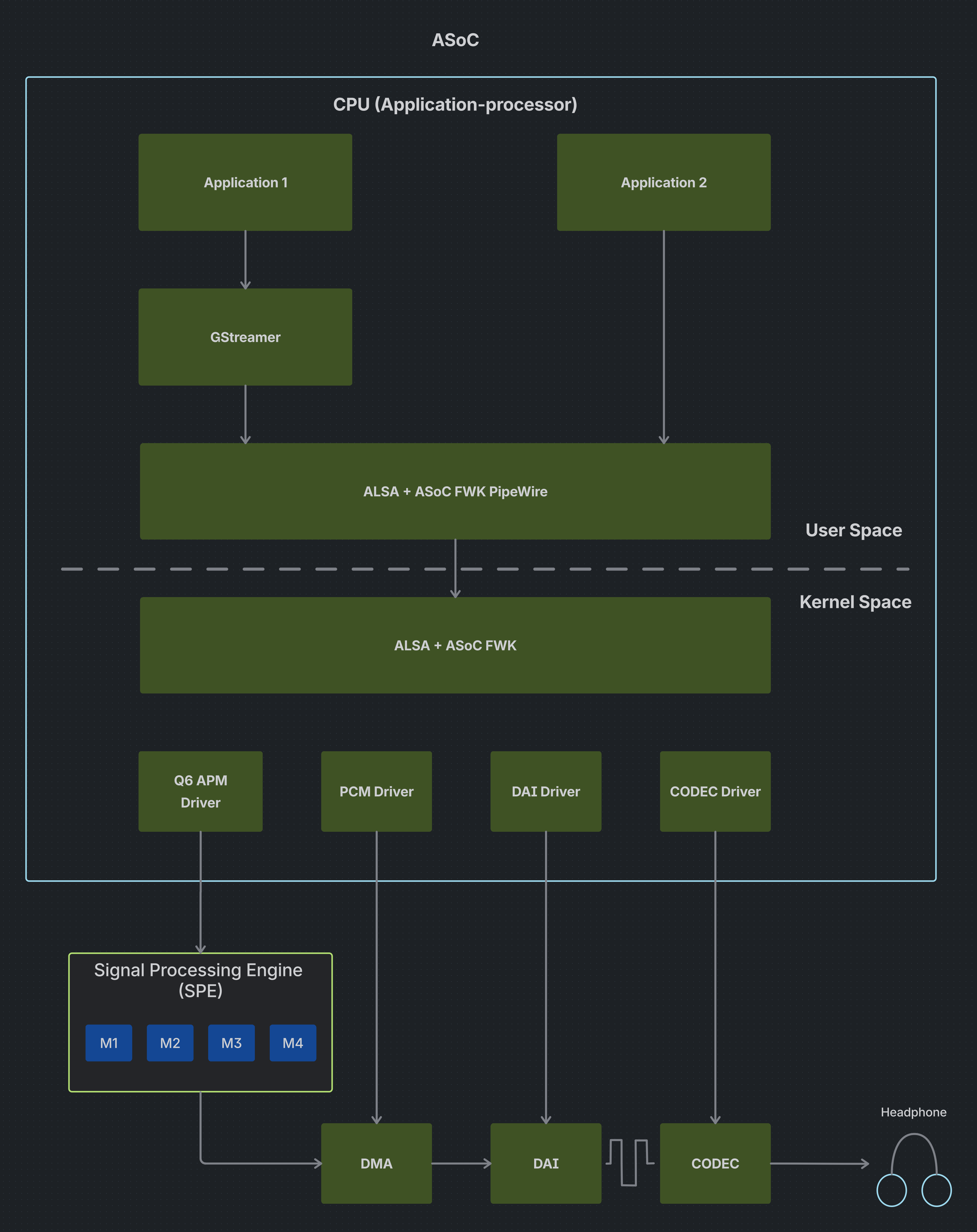
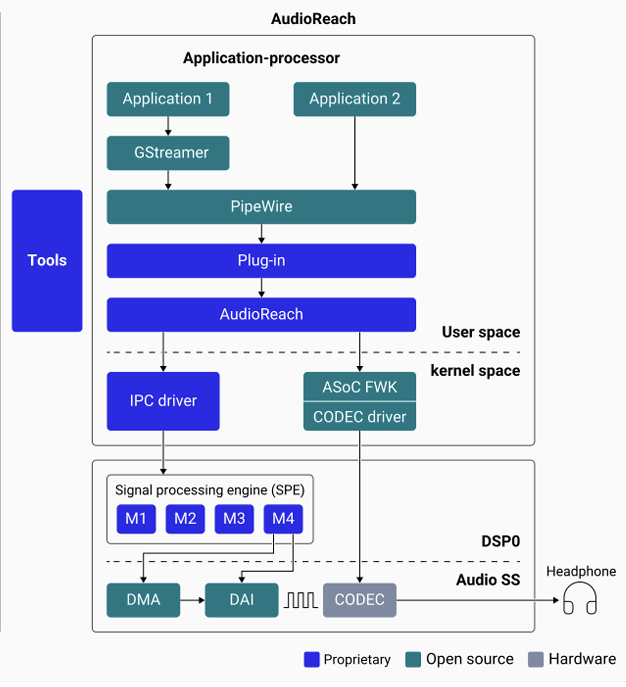
The following figure shows the high-level audio software architecture.

<div className="flex flex-col items-center gap-6">
  <div className="flex items-center gap-6">
    <div className="flex flex-1 flex-col items-center">
      <img src="https://mintcdn.com/qualcomm-staging/blZpKs_b9On5nj-y/archives/2.1/Technologies/Audio/media/qualcomm-linux-iot-audio-voice/asoc_architecture.png?fit=max&auto=format&n=blZpKs_b9On5nj-y&q=85&s=1cab53af8071e4b76447c91e5c8cdbaf" alt="High-level audio software architecture" className="block" width="3872" height="4882" data-path="archives/2.1/Technologies/Audio/media/qualcomm-linux-iot-audio-voice/asoc_architecture.png" />
    </div>

    <div className="flex flex-1 flex-col items-center">
      <img src="https://mintcdn.com/qualcomm-staging/blZpKs_b9On5nj-y/archives/2.1/Technologies/Audio/media/qualcomm-linux-iot-audio-voice/audioreach_architecture.png?fit=max&auto=format&n=blZpKs_b9On5nj-y&q=85&s=a304e17b240c1df3aa9eb2014552941b" alt="High-level audio software architecture" className="block" width="626" height="687" data-path="archives/2.1/Technologies/Audio/media/qualcomm-linux-iot-audio-voice/audioreach_architecture.png" />
    </div>
  </div>

  <p className="m-0 leading-none text-sm text-gray-700">
    High-level audio software architecture
  </p>
</div>

The following are the major audio software architecture components:

**Application 1**

A generic multimedia app that produces or consumes audio and sends it through higher-level frameworks (like GStreamer or PipeWire) instead of directly interacting with hardware.

**Application 2**

Another app sharing the same audio stack, demonstrating that multiple applications can simultaneously use and route audio streams.

**GStreamer**

A multimedia framework that processes audio/video (e.g., decoding, encoding) before passing audio streams to the system audio layer.

**PipeWire**

A user-space audio server that manages audio routing, mixing, and connections between applications and hardware devices.

**ALSA + ASoC FWK**

This layer bridges user space and hardware drivers, with ALSA handling sound subsystem functions and ASoC managing embedded audio hardware interactions.

**Q6 APM Driver**

A Qualcomm-specific driver that communicates with the DSP's Audio Processing Manager to control audio routing and processing.

**PCM driver**

Handles the transfer of raw digital audio (PCM data) between memory and the audio subsystem for playback or recording.

**DAI driver**

Manages the digital audio interface (like I2S/TDM), configuring how audio data is transferred between processor and codec.

**CODEC driver**

Controls the audio codec hardware, configuring it to convert digital audio signals to analog output and vice versa.

**PipeWire**

PipeWire is a multimedia server for Linux that routes audio between Apps and hardware. It replaces PulseAudio, offering low-latency, secure, and flexible media handling for applications.

**Platform Abstraction Layer (PAL)**

Provides higher-level audio-specific APIs to access the audio hardware and drivers to enable audio features.

**Audio Graph Manager (AGM)**

Provides interfaces to allow TinyALSA-based mixer controls and PCM/compressed plug-ins to interact and enable audio features.

**AudioReach Graph Service (ARGS)**

Consists of the Graph Service Layer (GSL), Generic Packet Router (GPR), and acdb Management Layer (AML) modules. Handles initialization and creation of graphs, and creation of packets for sending a series of commands to the AudioReach Engine (ARE).

**Audio calibration database (acdb)**

Includes information about various audio use cases such as graphs, module calibration data, etc. The Apps processor parses acdb files to get the graph information used by ARE to enable the use case.

**AudioReach Engine (ARE)**

Modular framework that runs on the LPAI DSP. It helps set up, configure, and run signal processing modules for audio features.

**Qualcomm Audio Calibration Tool (QACT™ Platform)**

PC-based software that provides a GUI to visualize, configure, and store audio graphs in the acdb for audio use cases.

## **Config 1 vs Config 2**

QLI 2.0 introduces an overlay model that allows customers to start with a clean open-source base build and optionally layer in Qualcomm's proprietary, DSP-accelerated audio stack — without requiring a full reflash. This is referred to as the Config 1 → Config 2 transition.

| **Attribute** | **Config 1 (Base Build)** | **Config 2 (Overlay)** |
| :- | :- | :- |
| Image recipe | `qcom-multimedia-image` | `qcom-multimedia-proprietary-image` |
| Audio stack | ASoC (upstream) | AudioReach (downstream) |

### **Config 1 — Upstream ASoC**

Config 1 uses the ALSA System-on-Chip (ASoC) framework. Audio runs entirely on the application processor using upstream kernel drivers, with no dependency on Qualcomm proprietary components.

#### **Key characteristics**

* Standard ALSA sound card exposed to userspace
* Audio pipeline components: Codec Driver, Platform Driver, Machine Driver
* UCM profiles (`ucm.conf`) used for routing
* ASoC topology binary (`.tplg`) for mixer paths and routing
* Compatible with `aplay`, `arecord`, GStreamer, and PipeWire via ALSA sinks/sources

#### **Kernel modules**

The following kernel modules are loaded in a Config 1 build:

* `q6apm_dai`
* `q6apm_lpass_dais`
* `q6prm`
* `q6prm_clocks`
* `snd-soc-sc8280xp`
* `snd_q6apm`
* `snd_q6dsp_common`

#### **When to choose Config 1**

* Full open-source, upstream kernel-only requirement
* No requirement for DSP-accelerated audio features (SVA, Fluence, Haptics)
* Targeting mainline Linux distributions or AOSP with upstream drivers
* No-touch or low-touch integration

#### **Build**

Config 1 builds the `qcom-multimedia-image`.

```bash theme={null}
git clone https://github.com/qualcomm-linux/meta-qcom.git -b master
kas shell meta-qcom/ci/<machine>.yml:meta-qcom/ci/qcom-distro.yml
bitbake qcom-multimedia-image
```

**`<machine>`** refers to the target-specific YML file under `meta-qcom/ci/`. All available machine YMLs are listed in that directory. For example, for the IQ-9075 EVK (Lemans), the YML file is `iq-9075-evk.yml`:

```bash theme={null}
git clone https://github.com/qualcomm-linux/meta-qcom.git -b master
kas shell meta-qcom/ci/iq-9075-evk.yml:meta-qcom/ci/qcom-distro.yml
bitbake qcom-multimedia-image
```

### **Config 2 — Downstream AudioReach**

Config 2 uses AudioReach — Qualcomm's modular Signal Processing Framework (SPF) that offloads audio processing to the dedicated Hexagon DSP, enabling low-power, high-performance audio.

#### **Key characteristics**

* Audio processing offloaded to ADSP (Hexagon DSP) — CPU remains idle during audio
* PAL (Platform Abstraction Layer) exposes higher-level audio APIs
* AGM (Audio Graph Manager) interfaces mixer controls and PCM plug-ins
* ACDB (Audio Calibration Database) manages graphs and tuning
* PipeWire connects to hardware via PAL source/sink plug-ins
* Supports advanced features not available in ASoC: SVA, Fluence ECNS, compressed offload, SSMD/MSMD, and real-time tuning via QACT

#### **AudioReach userspace package stack**

The following packages are installed when the Config 2 overlay is applied:

| **Package** | **Role** |
| :- | :- |
| `audioreach-audio-utils` | Audio utility tools |
| `audioreach-conf` | PAL / ACDB configuration files |
| `audioreach-graphservices` | GSL / Graph Service Layer |
| `audioreach-graphmgr` | Graph Manager |
| `audioreach-pal` | Platform Abstraction Layer |
| `audioreach-pipewire-plugin` | PAL sink/source for PipeWire |
| `audioreach-kernel` | Downstream kernel module recipes |

#### **When to choose Config 2**

* Customer requires Qualcomm-proprietary audio features (SVA, Fluence, SSMD/MSMD)
* Power-optimized audio playback/record is a priority (ADSP offload)
* Real-time tuning via QACT is needed
* Compressed audio offload (MP3, AAC) is required

#### **Build**

Config 2 builds the `qcom-multimedia-proprietary-image`. It layers the full AudioReach stack on top of Config 1.

<Note>
  Config 2 is supported on `aarch64` targets only and requires `qcom-distro.yml`.
</Note>

```bash theme={null}
git clone https://github.com/qualcomm-linux/meta-qcom.git -b master
kas shell meta-qcom/ci/<machine>.yml:meta-qcom/ci/qcom-distro.yml
bitbake qcom-multimedia-proprietary-image
```

**`<machine>`** refers to the target-specific YML file under `meta-qcom/ci/`. For example, for the IQ-9075 EVK (Lemans):

```bash theme={null}
git clone https://github.com/qualcomm-linux/meta-qcom.git -b master
kas shell meta-qcom/ci/iq-9075-evk.yml:meta-qcom/ci/qcom-distro.yml
bitbake qcom-multimedia-proprietary-image
```

### **Migration path: Config 1 → Config 2**

The transition from Config 1 to Config 2 is handled via an overlay mechanism. Customers do not need to reflash the base image.

<Steps>
  <Step title="Start with Config 1 base image">
    Build or flash the `qcom-multimedia-image` (Config 1 base).
  </Step>

  <Step title="Apply the overlay">
    Apply the `qcom-multimedia-proprietary-image` overlay.
  </Step>

  <Step title="Install AudioReach packages">
    AudioReach packages are installed via DNF overlay.
  </Step>

  <Step title="Switch kernel modules">
    The kernel switches from upstream ASoC modules to the AudioReach kernel driver.
  </Step>

  <Step title="Deploy PAL and ACDB configuration">
    PAL/ACDB configuration files are deployed (`audioreach-conf`).
  </Step>

  <Step title="Reconfigure PipeWire">
    PipeWire is reconfigured to use the AudioReach PAL sink/source plugin.
  </Step>

  <Step title="Validate">
    Validate with audio test suites and QACT tuning.
  </Step>
</Steps>

## **Next steps**

* [Enable audio](enable-audio) — Configure audio hardware and verify basic playback and capture
* [Customize audio graph](customize-audio-graph) — Customize audio use cases at the PAL level
* [Audio Addendum](https://dragonwingdocs.qualcomm.com/Technologies/Audio/audio-addendum-overview) — Learn about QACT and QXDM for calibration and diagnostics