> ## Documentation Index
> Fetch the complete documentation index at: https://dragonwingdocs-staging.qualcomm.com/llms.txt
> Use this file to discover all available pages before exploring further.
# Enable AprilTag pipeline with sample_apriltag
> The sample_apriltag is the ROS package to provide AprilTag pipeline samples for Qualcomm robotics platforms.
For more information, see [sample\_apriltag](https://github.com/qualcomm-qrb-ros/qrb_ros_samples/edit/main/robotics/sample_apriltag) GitHub repository.
 ## Pipeline flow for `sample_apriltag`
The following figure shows the pipeline flow for `sample_apriltag`.
## Pipeline flow for `sample_apriltag`
The following figure shows the pipeline flow for `sample_apriltag`.
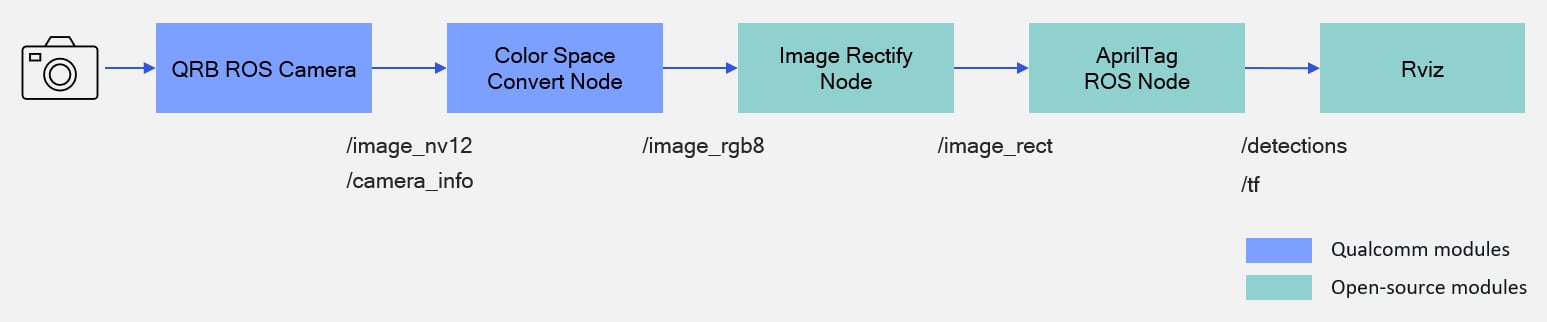 * The pipeline accepts an NV12 image from `qrb_ros_camera` and converts the color space to RGB8 format.
* Then, it uses `image_proc` to rectify the image, and outputs `/image_rect`.
* The `Apriltag` node detects tags and calculates their poses, which are published through `/tf`.
## ROS nodes used in the `sample_apriltag` pipeline
The following table lists the ROS nodes used in the `sample_apriltag` pipeline and describes what each node does.
| ROS Node | Description |
| - | - |
| [`qrb_ros::camera::CameraNode`](https://github.com/qualcomm-qrb-ros/qrb_ros_camera) | Qualcomm ROS 2 package that captures images with parameters and publishes them to ROS topics. |
| [`qrb_ros::colorspace_convert::ColorspaceConvertNode`](https://github.com/qualcomm-qrb-ros/qrb_ros_color_space_convert) | Provides a ROS node to convert image from nv12 to rgb8 format. |
| [`image_proc::RectifyNode`](https://github.com/ros-perception/image_pipeline/tree/rolling/image_proc) | Subscribes to unrectified image and Camera calibration metadata to take rectification. |
| [`apriltag_ros::AprilTagNode`](https://github.com/christianrauch/apriltag_ros) | This ROS 2 node uses the `AprilTag` library to detect AprilTags in images and publishes their poses, IDs and additional metadata. |
## ROS topics used in the `sample_apriltag` pipeline
The following table lists the ROS topics used in the `sample_apriltag` pipeline, with the message type and the node that publishes each topic.
| ROS Topic | Type | Published by |
| - | - | - |
| `/apriltag/image_nv12` | `sensor_msgs/msg/Image` | `qrb_ros::camera::CameraNode` |
| `/apriltag/camera_info` | `sensor_msgs/msg/CameraInfo.msg` | `qrb_ros::camera::CameraNode` |
| `/apriltag/image_rgb8` | `sensor_msgs/msg/Image` | `qrb_ros::colorspace_convert::ColorspaceConvertNode` |
| `/apriltag/image_rect` | `sensor_msgs/msg/Image` | `image_proc::RectifyNode` |
| `/apriltag/detections` | `apriltag_msgs/msg/AprilTagDetectionArray` | `apriltag_ros::AprilTagNode` |
| `/tf` | `tf2_msgs/msg/TFMessage` | `apriltag_ros::AprilTagNode` |
## Prerequisites
You have set up the device, installed ROS2 Jazzy and the Qualcomm Intelligent Robotics (QIR) SDK on the device according to [Install the QIR SDK](./install-the-qir-sdk).
## Run out-of-the-box `sample_apriltag`
```bash Add the package repositories theme={null}
sudo add-apt-repository ppa:ubuntu-qcom-iot/qcom-ppa
sudo add-apt-repository ppa:ubuntu-qcom-iot/qirp
sudo apt update
```
```bash Install the packages theme={null}
sudo apt install ros-jazzy-sample-apriltag
```
```bash Start the pipeline theme={null}
export XDG_RUNTIME_DIR=/run/user/1000
export WAYLAND_DISPLAY=wayland-1
sudo systemctl start weston-autostart.service
source /opt/ros/jazzy/setup.bash
ros2 launch sample_apriltag sample_apriltag.launch.py
```
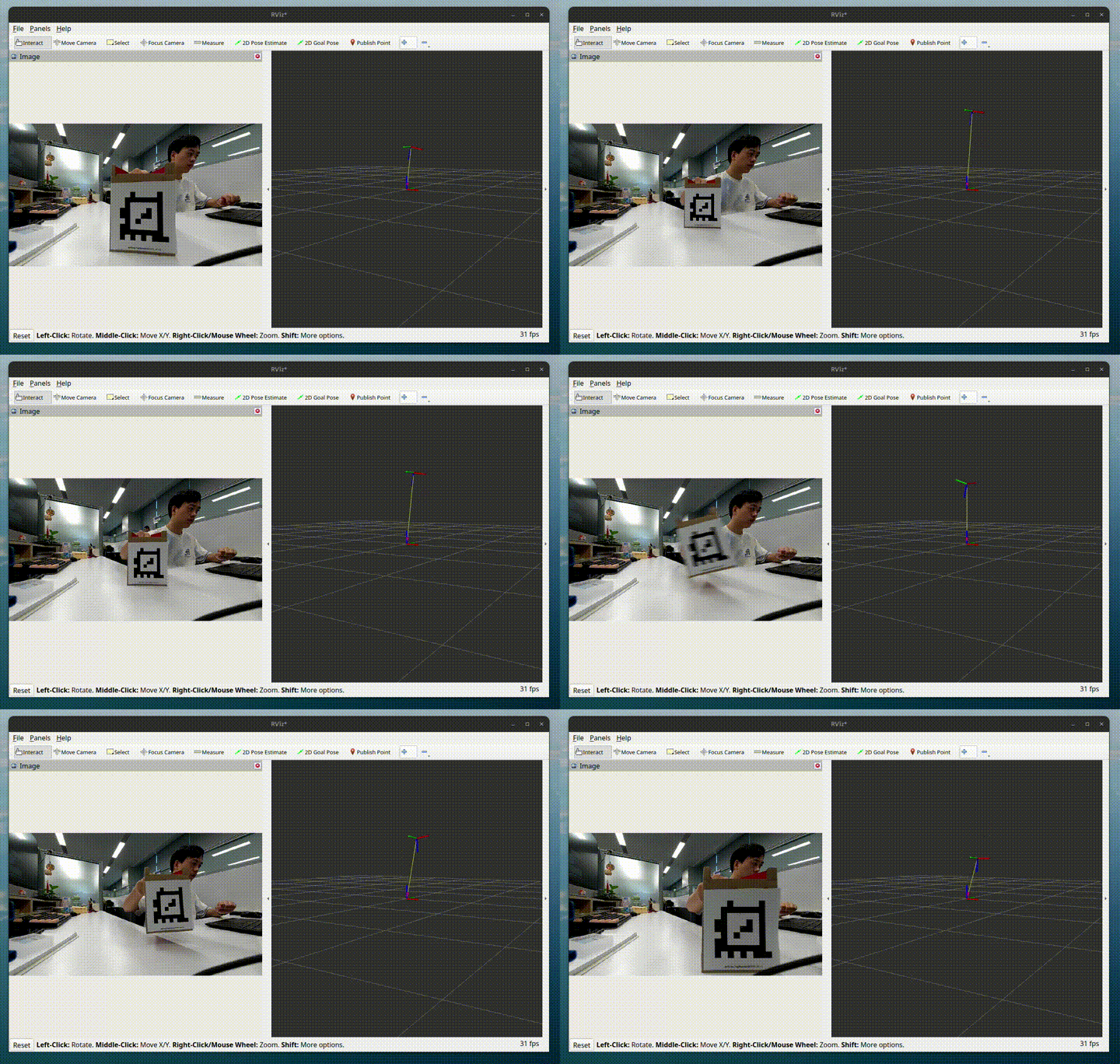
| `tagStandard41h12: 1` | `tagStandard41h12: 2` | `tagStandard41h12: 3` |
| - | - | - |
|
* The pipeline accepts an NV12 image from `qrb_ros_camera` and converts the color space to RGB8 format.
* Then, it uses `image_proc` to rectify the image, and outputs `/image_rect`.
* The `Apriltag` node detects tags and calculates their poses, which are published through `/tf`.
## ROS nodes used in the `sample_apriltag` pipeline
The following table lists the ROS nodes used in the `sample_apriltag` pipeline and describes what each node does.
| ROS Node | Description |
| - | - |
| [`qrb_ros::camera::CameraNode`](https://github.com/qualcomm-qrb-ros/qrb_ros_camera) | Qualcomm ROS 2 package that captures images with parameters and publishes them to ROS topics. |
| [`qrb_ros::colorspace_convert::ColorspaceConvertNode`](https://github.com/qualcomm-qrb-ros/qrb_ros_color_space_convert) | Provides a ROS node to convert image from nv12 to rgb8 format. |
| [`image_proc::RectifyNode`](https://github.com/ros-perception/image_pipeline/tree/rolling/image_proc) | Subscribes to unrectified image and Camera calibration metadata to take rectification. |
| [`apriltag_ros::AprilTagNode`](https://github.com/christianrauch/apriltag_ros) | This ROS 2 node uses the `AprilTag` library to detect AprilTags in images and publishes their poses, IDs and additional metadata. |
## ROS topics used in the `sample_apriltag` pipeline
The following table lists the ROS topics used in the `sample_apriltag` pipeline, with the message type and the node that publishes each topic.
| ROS Topic | Type | Published by |
| - | - | - |
| `/apriltag/image_nv12` | `sensor_msgs/msg/Image` | `qrb_ros::camera::CameraNode` |
| `/apriltag/camera_info` | `sensor_msgs/msg/CameraInfo.msg` | `qrb_ros::camera::CameraNode` |
| `/apriltag/image_rgb8` | `sensor_msgs/msg/Image` | `qrb_ros::colorspace_convert::ColorspaceConvertNode` |
| `/apriltag/image_rect` | `sensor_msgs/msg/Image` | `image_proc::RectifyNode` |
| `/apriltag/detections` | `apriltag_msgs/msg/AprilTagDetectionArray` | `apriltag_ros::AprilTagNode` |
| `/tf` | `tf2_msgs/msg/TFMessage` | `apriltag_ros::AprilTagNode` |
## Prerequisites
You have set up the device, installed ROS2 Jazzy and the Qualcomm Intelligent Robotics (QIR) SDK on the device according to [Install the QIR SDK](./install-the-qir-sdk).
## Run out-of-the-box `sample_apriltag`
```bash Add the package repositories theme={null}
sudo add-apt-repository ppa:ubuntu-qcom-iot/qcom-ppa
sudo add-apt-repository ppa:ubuntu-qcom-iot/qirp
sudo apt update
```
```bash Install the packages theme={null}
sudo apt install ros-jazzy-sample-apriltag
```
```bash Start the pipeline theme={null}
export XDG_RUNTIME_DIR=/run/user/1000
export WAYLAND_DISPLAY=wayland-1
sudo systemctl start weston-autostart.service
source /opt/ros/jazzy/setup.bash
ros2 launch sample_apriltag sample_apriltag.launch.py
```
| `tagStandard41h12: 1` | `tagStandard41h12: 2` | `tagStandard41h12: 3` |
| - | - | - |
|  |
|  |
|  |
a. Start a terminal and run the following commands to check the apriltag detection result.
```bash theme={null}
(ssh) export ROS_DOMAIN_ID=123
(ssh) ros2 topic echo /apriltag/detections
```
The pipeline outputs the detection results with `/apriltag/detections` and detects the tag pose with `/tf`.
b. To check the topic output, run the following command:
```bash theme={null}
(ssh) ros2 topic echo /apriltag/detections
```
**Result:**
```yaml Output theme={null}
header:
stamp:
sec: 1756288539
nanosec: 411482784
frame_id: stream1_2625
detections:
- family: tagStandard41h12
id: 1
hamming: 0
goodness: 0.0
decision_margin: 153.66729736328125
centre:
x: 595.2331201546427
y: 382.94486450729545
...
```
The result shows the detected tag: `tagStandard41h12` and the tag ID is `1`.
## Build from the source of `sample_apriltag`
Build `sample_apriltag` from source when you need to change the sample code. The device steps install the dependencies, clone the source repository, and build the package.
### Device steps
```bash Install the dependencies theme={null}
sudo apt install ros-dev-tools \
ros-jazzy-image-proc \
ros-jazzy-apriltag-ros \
ros-jazzy-qrb-ros-camera \
ros-jazzy-qrb-ros-colorspace-convert
```
```bash Clone the sample repository theme={null}
mkdir -p ~/qrb_ros_sample_ws/src && cd ~/qrb_ros_sample_ws/src
source /opt/ros/jazzy/setup.bash
git clone https://github.com/qualcomm-qrb-ros/qrb_ros_samples.git
```
```bash Build the sample theme={null}
cd ~/qrb_ros_sample_ws/src/qrb_ros_samples/robotics/sample_apriltag
colcon build --packages-up-to sample_apriltag
source install/setup.bash
```
Run and test according to steps 2-4 of [Run out-of-the-box sample\_apriltag](./enable-apriltag-pipeline-with-sample-apriltag#run-out-of-the-box-sample_apriltag).
|
a. Start a terminal and run the following commands to check the apriltag detection result.
```bash theme={null}
(ssh) export ROS_DOMAIN_ID=123
(ssh) ros2 topic echo /apriltag/detections
```
The pipeline outputs the detection results with `/apriltag/detections` and detects the tag pose with `/tf`.
b. To check the topic output, run the following command:
```bash theme={null}
(ssh) ros2 topic echo /apriltag/detections
```
**Result:**
```yaml Output theme={null}
header:
stamp:
sec: 1756288539
nanosec: 411482784
frame_id: stream1_2625
detections:
- family: tagStandard41h12
id: 1
hamming: 0
goodness: 0.0
decision_margin: 153.66729736328125
centre:
x: 595.2331201546427
y: 382.94486450729545
...
```
The result shows the detected tag: `tagStandard41h12` and the tag ID is `1`.
## Build from the source of `sample_apriltag`
Build `sample_apriltag` from source when you need to change the sample code. The device steps install the dependencies, clone the source repository, and build the package.
### Device steps
```bash Install the dependencies theme={null}
sudo apt install ros-dev-tools \
ros-jazzy-image-proc \
ros-jazzy-apriltag-ros \
ros-jazzy-qrb-ros-camera \
ros-jazzy-qrb-ros-colorspace-convert
```
```bash Clone the sample repository theme={null}
mkdir -p ~/qrb_ros_sample_ws/src && cd ~/qrb_ros_sample_ws/src
source /opt/ros/jazzy/setup.bash
git clone https://github.com/qualcomm-qrb-ros/qrb_ros_samples.git
```
```bash Build the sample theme={null}
cd ~/qrb_ros_sample_ws/src/qrb_ros_samples/robotics/sample_apriltag
colcon build --packages-up-to sample_apriltag
source install/setup.bash
```
Run and test according to steps 2-4 of [Run out-of-the-box sample\_apriltag](./enable-apriltag-pipeline-with-sample-apriltag#run-out-of-the-box-sample_apriltag).