> ## Documentation Index
> Fetch the complete documentation index at: https://dragonwingdocs-staging.qualcomm.com/llms.txt
> Use this file to discover all available pages before exploring further.
# Memory and Storage
The Qualcomm Linux platform supports four primary storage types.
| Storage Type | Versions |
| - | - |
| **Universal Flash Storage (UFS)** | v2.1, v2.2, v3.1 |
| **Embedded Multi-Media Card (eMMC)** | v5.1 |
| **Non-Volatile Memory Express (NVMe)** | v1.3 |
| **Secure Digital (SD) Card** | v3.0 |
Configure the device to boot from only one storage source. Using both sources for bootable files may cause system crashes or unpredictable behavior.
## UFS Storage
### Features
| Feature | Description |
| - | - |
| **Lanes** | 2 lanes supported |
| **Gear** | HS Gear 1, 2, 3, and 4 |
| **Low-Power Mode** | Link hibernate and device sleep |
| **Hot-Plug** | Not supported (embedded only) |
### Power Management States
**Auto-Hibern8 (AH8)** — Transitions PHY link to Hibernate after 150 ms of idle time (adjustable).
```bash theme={null}
cat /sys/devices/platform/soc@0/1d84000.ufs/auto_hibern8
```
**Clock Gating** — Enabled by default.
```bash theme={null}
cat /sys/devices/platform/soc@0/1d84000.ufs/clkgate_enable
echo 0 > /sys/devices/platform/soc@0/1d84000.ufs/clkgate_enable # Disable for debugging
```
**Clock Scaling** — Enabled by default; disabling increases power consumption.
```bash theme={null}
cat /sys/devices/platform/soc@0/1d84000.ufs/clkscale_enable
```
### UFS Provisioning
Set `bConfigDescrLock="0"` during development. Set to `"1"` after finalization to prevent reprovisioning.
**Default Partition Layout:**
* **LUN0** — Linux data and filesystem images
* **LUN1 & LUN2** — Boot WLUN (0xB0) alternates for fail-safe XBL backup
* **LUN4** — Rest of boot chain
* **LUN6 & LUN7** — Unused by default
### Architecture Diagrams
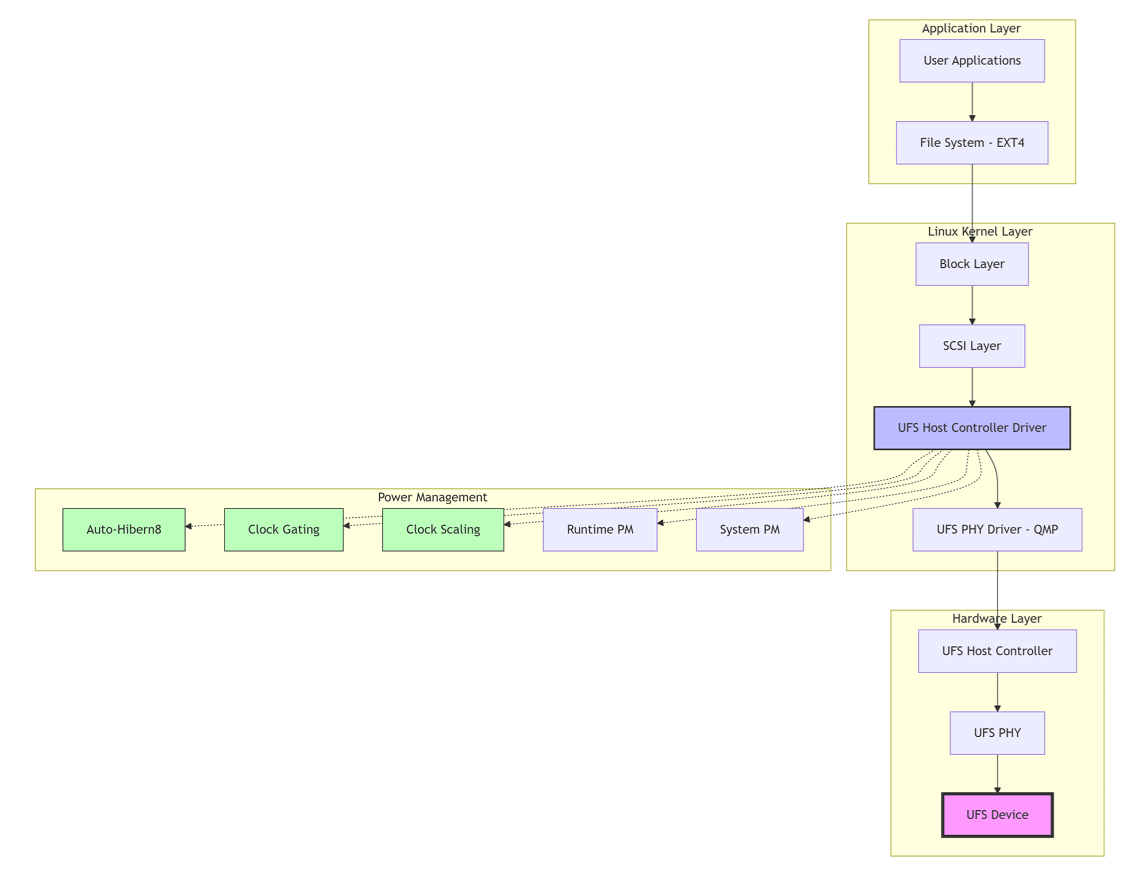
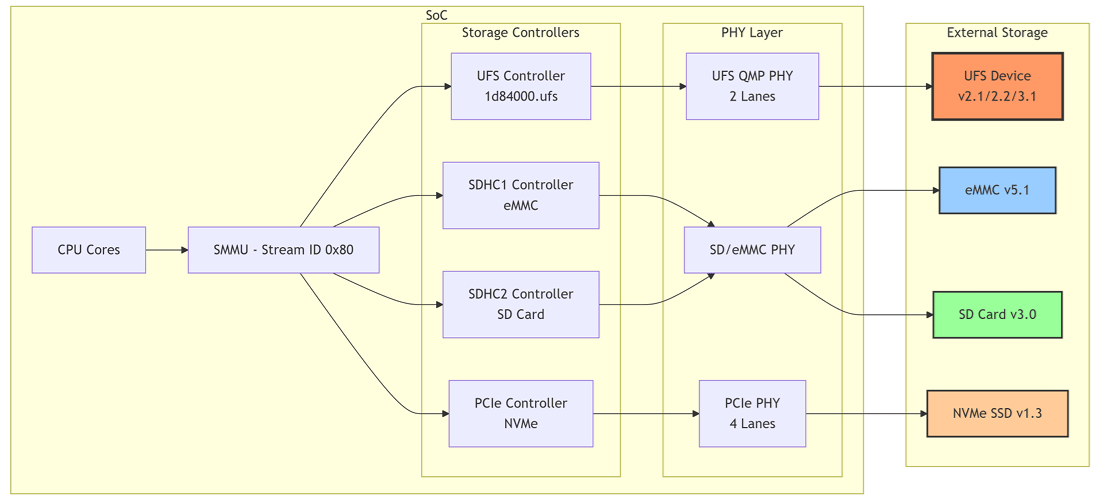
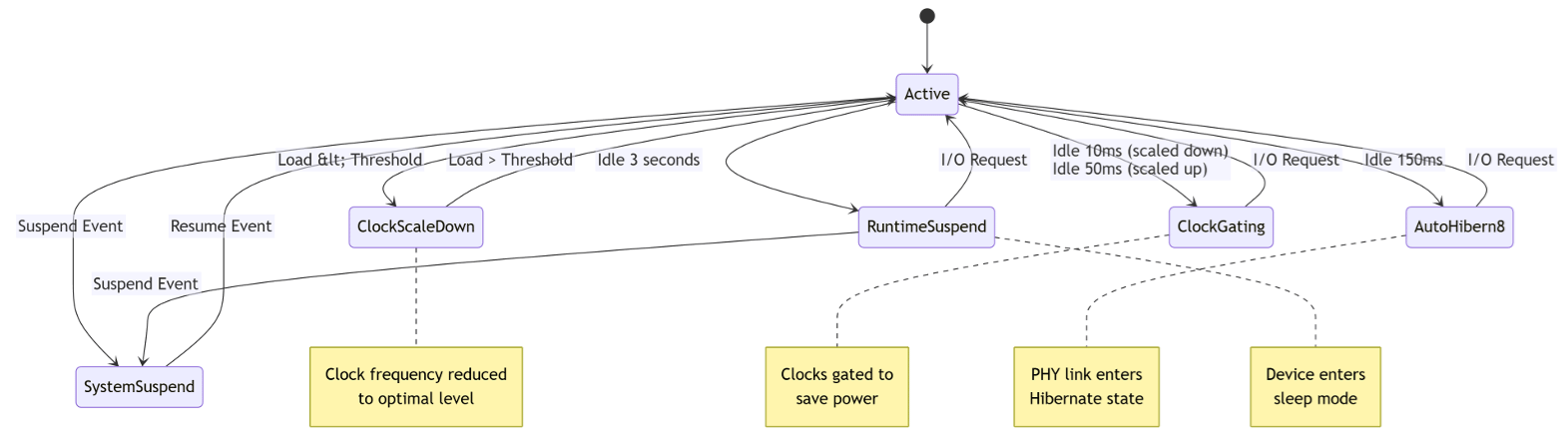 ## eMMC Storage
### Features
| Feature | Description |
| - | - |
| **Speed** | DDR50, HS200, HS400, HS400 Enhanced |
| **Sleep Mode** | Clock gating and auto suspend |
| **Command Queuing** | Multiple simultaneous commands |
### Device Tree Configuration
```dts theme={null}
&sdhc_1 {
status = "okay";
pinctrl-names = "default", "sleep";
pinctrl-0 = <&sdc1_on>;
pinctrl-1 = <&sdc1_off>;
vmmc-supply = <&vreg_l19a_2p9>;
vqmmc-supply = <&vreg_l12a_1p8>;
};
```
## SD Card Storage
| Feature | Description |
| - | - |
| **Bus Width** | 4-bit mode |
| **Speed** | SDR50, SDR104, DDR50 |
| **Hot-Plug** | Supported |
## NVMe Storage
| Feature | Description |
| - | - |
| **Lanes** | 4 lanes over PCIe port (PCIe1) |
| **Interface** | High-speed serial |
## Configuration Guide
### Mount File Systems
```bash theme={null}
mkdir /tmp/data
mount -t ext4 /dev/sda3 /tmp/data
df -a
```
```bash theme={null}
mkdir sdcard
mkfs.vfat /dev/mmcblk1p1
mount -t vfat /dev/mmcblk1p1 /sdcard
df -a
```
```bash theme={null}
fdisk /dev/nvme0n1
reboot
mkfs.ext4 /dev/nvme0n1p1
mount /dev/nvme0n1p1 /media
df -a
```
### Power Management Control
```bash theme={null}
mount -t debugfs none /sys/kernel/debug
# UFS Auto-Hibern8
echo > /sys/devices/platform/soc@0/1d84000.ufs/auto_hibern8
# UFS Clock Gating
echo 0 > /sys/devices/platform/soc@0/1d84000.ufs/clkgate_enable # Disable
echo 1 > /sys/devices/platform/soc@0/1d84000.ufs/clkgate_enable # Enable
```
## Troubleshooting
## eMMC Storage
### Features
| Feature | Description |
| - | - |
| **Speed** | DDR50, HS200, HS400, HS400 Enhanced |
| **Sleep Mode** | Clock gating and auto suspend |
| **Command Queuing** | Multiple simultaneous commands |
### Device Tree Configuration
```dts theme={null}
&sdhc_1 {
status = "okay";
pinctrl-names = "default", "sleep";
pinctrl-0 = <&sdc1_on>;
pinctrl-1 = <&sdc1_off>;
vmmc-supply = <&vreg_l19a_2p9>;
vqmmc-supply = <&vreg_l12a_1p8>;
};
```
## SD Card Storage
| Feature | Description |
| - | - |
| **Bus Width** | 4-bit mode |
| **Speed** | SDR50, SDR104, DDR50 |
| **Hot-Plug** | Supported |
## NVMe Storage
| Feature | Description |
| - | - |
| **Lanes** | 4 lanes over PCIe port (PCIe1) |
| **Interface** | High-speed serial |
## Configuration Guide
### Mount File Systems
```bash theme={null}
mkdir /tmp/data
mount -t ext4 /dev/sda3 /tmp/data
df -a
```
```bash theme={null}
mkdir sdcard
mkfs.vfat /dev/mmcblk1p1
mount -t vfat /dev/mmcblk1p1 /sdcard
df -a
```
```bash theme={null}
fdisk /dev/nvme0n1
reboot
mkfs.ext4 /dev/nvme0n1p1
mount /dev/nvme0n1p1 /media
df -a
```
### Power Management Control
```bash theme={null}
mount -t debugfs none /sys/kernel/debug
# UFS Auto-Hibern8
echo > /sys/devices/platform/soc@0/1d84000.ufs/auto_hibern8
# UFS Clock Gating
echo 0 > /sys/devices/platform/soc@0/1d84000.ufs/clkgate_enable # Disable
echo 1 > /sys/devices/platform/soc@0/1d84000.ufs/clkgate_enable # Enable
```
## Troubleshooting
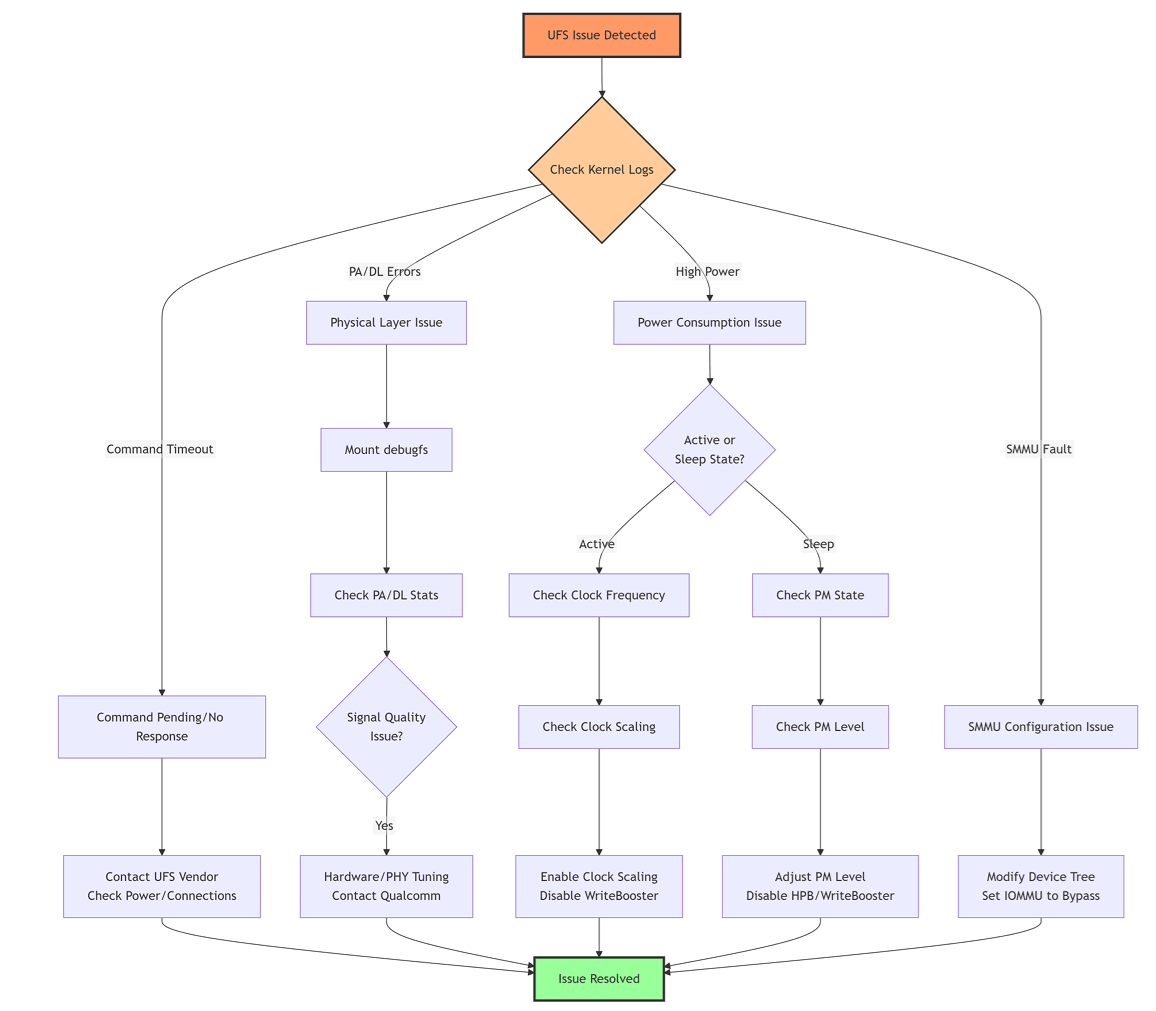 **Symptoms:** `ufshcd_abort: cmd pending in the device`
Contact UFS device vendor; check device compatibility and power supply stability.
**Symptoms:** `ufshcd_abort: no response from device, err -110`
Check physical connections, verify power rails, check PHY initialization.
```bash theme={null}
mount -t debugfs none /sys/kernel/debug
cat /sys/kernel/debug/ufshcd/1d84000.ufs/stats
```
Indicates poor signal quality. Check PCB layout and PHY settings.
In the `ufshc_mem` node in the SoC DTSI file, change:
```dts theme={null}
qcom,iommu-dma = "fastmap";
```
to:
```dts theme={null}
qcom,iommu-dma = "bypass";
```
## Command Reference
### UFS Commands
| Purpose | Command |
| - | - |
| Check PA/DL error count | `cat /sys/kernel/debug/ufshcd/1d84000.ufs/stats` |
| Read current clock frequency | `cat /sys/devices/platform/soc@0/1d84000.ufs/devfreq/1d84000.ufs/cur_freq` |
| Read device state | `cat /sys/devices/platform/soc@0/1d84000.ufs/power_info/dev_pm` |
| Read link state | `cat /sys/devices/platform/soc@0/1d84000.ufs/power_info/link_state` |
| Read runtime status | `cat /sys/devices/platform/soc@0/1d84000.ufs/power/runtime_status` |
### eMMC Commands
| Purpose | Command |
| - | - |
| Error stats | `cat /sys/kernel/debug/mmc0/err_stats` |
| Current clock | `cat /sys/kernel/debug/mmc0/clock` |
| Runtime status | `cat /sys/devices/platform/soc@0/87c4000/power/runtime_status` |
For IQ-8275, the eMMC address is `87c4000`.
## References
* [EXT4 Filesystem Introduction](https://opensource.com/article/17/5/introduction-ext4-filesystem)
**Symptoms:** `ufshcd_abort: cmd pending in the device`
Contact UFS device vendor; check device compatibility and power supply stability.
**Symptoms:** `ufshcd_abort: no response from device, err -110`
Check physical connections, verify power rails, check PHY initialization.
```bash theme={null}
mount -t debugfs none /sys/kernel/debug
cat /sys/kernel/debug/ufshcd/1d84000.ufs/stats
```
Indicates poor signal quality. Check PCB layout and PHY settings.
In the `ufshc_mem` node in the SoC DTSI file, change:
```dts theme={null}
qcom,iommu-dma = "fastmap";
```
to:
```dts theme={null}
qcom,iommu-dma = "bypass";
```
## Command Reference
### UFS Commands
| Purpose | Command |
| - | - |
| Check PA/DL error count | `cat /sys/kernel/debug/ufshcd/1d84000.ufs/stats` |
| Read current clock frequency | `cat /sys/devices/platform/soc@0/1d84000.ufs/devfreq/1d84000.ufs/cur_freq` |
| Read device state | `cat /sys/devices/platform/soc@0/1d84000.ufs/power_info/dev_pm` |
| Read link state | `cat /sys/devices/platform/soc@0/1d84000.ufs/power_info/link_state` |
| Read runtime status | `cat /sys/devices/platform/soc@0/1d84000.ufs/power/runtime_status` |
### eMMC Commands
| Purpose | Command |
| - | - |
| Error stats | `cat /sys/kernel/debug/mmc0/err_stats` |
| Current clock | `cat /sys/kernel/debug/mmc0/clock` |
| Runtime status | `cat /sys/devices/platform/soc@0/87c4000/power/runtime_status` |
For IQ-8275, the eMMC address is `87c4000`.
## References
* [EXT4 Filesystem Introduction](https://opensource.com/article/17/5/introduction-ext4-filesystem)