> ## Documentation Index
> Fetch the complete documentation index at: https://dragonwingdocs-staging.qualcomm.com/llms.txt
> Use this file to discover all available pages before exploring further.
# Add post-processing support for a custom model
> Add a custom post-processing module to a QIM SDK pipeline when the built-in qtimlpostprocess modules do not support your model output format.
This page explains how to integrate a custom post-processing module into a QIM SDK pipeline when the built-in `qtimlpostprocess` modules do not support your model's output format.
Use this workflow when your model can run with an existing QIM SDK inference plugin, but its output tensors require custom processing before they can be converted into labels, bounding boxes, masks, keypoints, raw tensors, or other application-specific metadata. This guide uses a YOLOv8-based object detection model as an end-to-end example to demonstrate each step of the integration process.
**Step 3a of the [application development workflow](../topic/imsdk-app-development#application-development-workflow).** Use this path when onboarding a new model whose output format is not supported by any of the built-in post-processing modules. If you have not yet verified that a custom post-processing module is required, first complete [step 2a](../topic/integrate-custom-model).
## Before you begin
Before creating a custom post-processing module, verify the following prerequisites. A custom implementation is only necessary when none of the built-in qtimlpostprocess modules can process your model's output format.
| Verify Before You Start | Validation Method |
| - | - |
| No built-in post-processing module supports your model output | Run gst-inspect-1.0 qtimlpostprocess on the target device and compare the supported tensor formats and shapes with your model outputs. A custom module is required only if none of the built-in modules are compatible. |
| The model runs successfully with a QIM SDK inference plugin | Confirm that the model loads correctly and generates output tensors before implementing custom post-processing. |
| The output tensor layout is understood | Document the number of output tensors, their data types, dimensions, and the information each tensor represents. |
| A host system is needed for cross-compilation | Use Ubuntu 22.04 or Ubuntu 24.04 with the required build tools, including `cmake` and `g++-aarch64-linux-gnu`. |
| Device access | Ensure SSH access is configured so you can deploy, test, and debug the custom module on the device. |
It is very common for one module to serve several models. For example, the `yolov8` module handles multiple YOLO-family detectors whose output structure is the same. Check the reported tensor shapes carefully before concluding that a custom module is required.
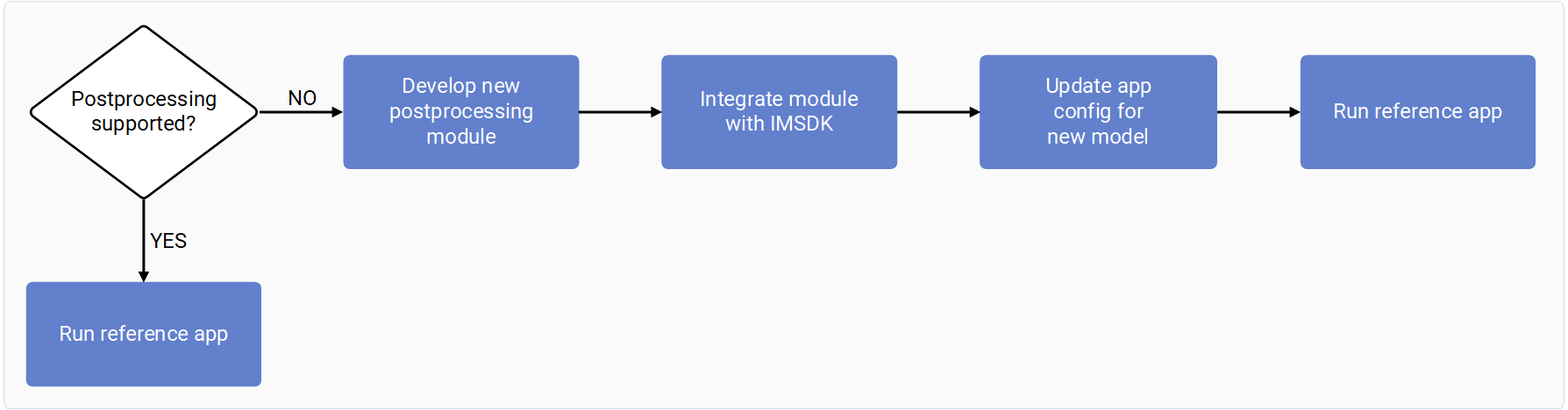
The following diagram shows the overall process to add your own post-processing support, from developing and integrating the module to running the reference application.
 ## AI pipeline overview
The Qualcomm Intelligent Multimedia SDK (QIM SDK) provides the building blocks to construct AI, multimedia, and computer vision pipelines. An AI workflow is built from three key GStreamer stages, and a custom post-processing module extends only the third stage.
| Stage | Plugin | Responsibility |
| - | - | - |
| Preprocessing | `qtimlvconverter` | Convert the incoming data stream to a tensor format suitable for AI inference. |
| Inference | `qtimltflite`, `qtimlqnn` | Run inference with the AI model and dequantize the output tensor. This stage performs no preprocessing or post-processing beyond dequantization. |
| Post-processing | `qtimlpostprocess` | Parse the output tensors and generate a buffer containing machine learning metadata. |
The post-processing stage can deliver metadata in one of the following ways:
* Attach it to the source stream using `qtimetamuxer`.
* Stream it directly to endpoints such as RTSP, RTMP, or Redis.
* Convert it to an image mask that is overlaid on the source video frame using `qtivcomposer`.
## AI pipeline overview
The Qualcomm Intelligent Multimedia SDK (QIM SDK) provides the building blocks to construct AI, multimedia, and computer vision pipelines. An AI workflow is built from three key GStreamer stages, and a custom post-processing module extends only the third stage.
| Stage | Plugin | Responsibility |
| - | - | - |
| Preprocessing | `qtimlvconverter` | Convert the incoming data stream to a tensor format suitable for AI inference. |
| Inference | `qtimltflite`, `qtimlqnn` | Run inference with the AI model and dequantize the output tensor. This stage performs no preprocessing or post-processing beyond dequantization. |
| Post-processing | `qtimlpostprocess` | Parse the output tensors and generate a buffer containing machine learning metadata. |
The post-processing stage can deliver metadata in one of the following ways:
* Attach it to the source stream using `qtimetamuxer`.
* Stream it directly to endpoints such as RTSP, RTMP, or Redis.
* Convert it to an image mask that is overlaid on the source video frame using `qtivcomposer`.
 Only the post-processing module is your responsibility. Preprocessing, inference, and metadata consumption are standard QIM SDK elements, and the `qtimlpostprocess` plugin handles batching, output-format negotiation, and result limiting around your module.
### Example: Use ML metadata directly
In this example, the source stream is not propagated after the inference plugin — the metadata is consumed directly.
Only the post-processing module is your responsibility. Preprocessing, inference, and metadata consumption are standard QIM SDK elements, and the `qtimlpostprocess` plugin handles batching, output-format negotiation, and result limiting around your module.
### Example: Use ML metadata directly
In this example, the source stream is not propagated after the inference plugin — the metadata is consumed directly.
 ### Example: Attach ML metadata to the source video
In this example, the ML metadata is attached to the source video. An overlay uses the attached metadata to draw bounding boxes, text, and other visual elements. The result is either displayed on screen or streamed over a network.
### Example: Attach ML metadata to the source video
In this example, the ML metadata is attached to the source video. An overlay uses the attached metadata to draw bounding boxes, text, and other visual elements. The result is either displayed on screen or streamed over a network.
 ### Example: Convert ML metadata to an image mask
In this example, the ML metadata is converted into an image mask and then blitted on top of the source stream.
### Example: Convert ML metadata to an image mask
In this example, the ML metadata is converted into an image mask and then blitted on top of the source stream.
 ## qtimlpostprocess plugin behavior
`qtimlpostprocess` is a customizable plugin that provides a library interface for post-processing the tensor output of inference plugins. The post-processing module is responsible for tensor parsing and produces a list of predictions.
Each post-processing module handles one type of ML model and its variants — for example, all YOLOv8 detection variants. The plugin manages module execution, output generation (ML metadata, image masks, or tensors), batching, ML staging, and related tasks.
## qtimlpostprocess plugin behavior
`qtimlpostprocess` is a customizable plugin that provides a library interface for post-processing the tensor output of inference plugins. The post-processing module is responsible for tensor parsing and produces a list of predictions.
Each post-processing module handles one type of ML model and its variants — for example, all YOLOv8 detection variants. The plugin manages module execution, output generation (ML metadata, image masks, or tensors), batching, ML staging, and related tasks.
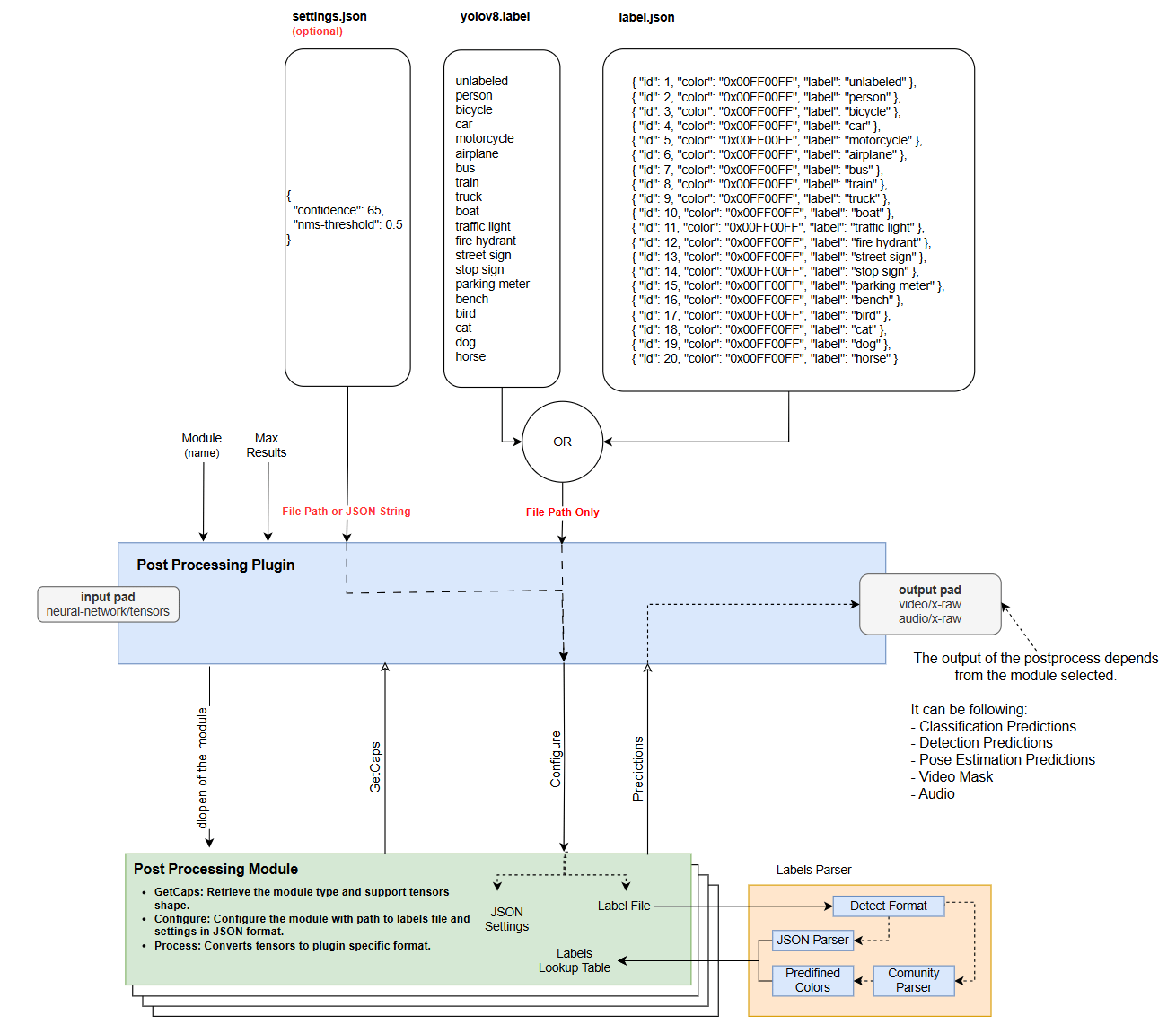 The plugin receives a list of tensors as input, encapsulated in GStreamer buffers. ML metadata attached to each buffer specifies the number of tensors, tensor shapes, model input tensor shapes, how much of each input tensor is filled with stream data, timestamps, and batching indexes.
### Plugin properties
| Plugin property | Required? | Purpose | Example |
| - | - | - | - |
| `module` | Required | Selects the post-processing module that parses the output tensors. It does not define the plugin output type — that is set during caps negotiation. | `module=yolov8` |
| `settings` | Optional | Passes module-specific JSON configuration (as a string or file path), such as confidence thresholds, NMS thresholds, keypoints, or tokens. | `settings="{\"confidence\": 75.0}"` |
| `labels` | Optional | Provides a labels file used to map class IDs or indices to readable labels. | `labels=${HOME}/Downloads/qimsdk_samples/labels/yolox.json` |
| `results` | Optional | Limits the number of results emitted after filtering. If the model detects more results than allowed, the lowest-confidence results are dropped. | `results=10` |
### Output formats
The output format is negotiated through the GStreamer pipeline. The most suitable format is negotiated automatically, but you can specify it manually with a GStreamer caps filter. The plugin supports a single source pad, so if the application needs more than one output format simultaneously, add another `qtimlpostprocess` instance in the pipeline.
| Output format | Description | Use when |
| - | - | - |
| Text metadata | Serializes ML metadata so it can be attached to the source stream (using `qtimetamuxer`) or consumed by downstream plugins. | The application needs labels, boxes, scores, or other structured results. |
| Image mask | Generates a transparent frame with visual results such as boxes, labels, dots, or lines. For example, an object-detection module draws boxes with labels, and `qtivcomposer` blits the mask onto the video stream. | The application needs to blend AI results back onto the video stream. |
| Tensor | Generates tensor output from the post-processing stage. | The pipeline chains multiple ML models and the next model requires a modified tensor input — for example, the first stage produces four tensors and the next stage needs three of them. |
The plugin supports the following model types:
* Object detection
* Image classification
* Image segmentation
* Super resolution
* Pose estimation
* Audio classification
## Write a post-processing module
A post-processing module is a shared library that parses the tensor output from inference plugins. The `qtimlpostprocess` plugin loads and runs the module at runtime. QIM SDK provides a wide variety of out-of-the-box modules.
| Module category | Example built-in modules | Use case |
| - | - | - |
| Object detection | `yolov5`, `yolov8`, `yolo-nas`, `ssd-mobilenet`, `qfd`, `qpd`, `east-textdt` | Use when the model output can be decoded into boxes, labels, scores, or landmarks. |
| Classification | `mobilenet`, `mobilenet-softmax`, `resnet`, `ocr`, `qfr` | Use when the model outputs class scores or recognition results. |
| Pose estimation | `hrnet`, `lite-3dmm`, `posenet` | Use when the model outputs body, face, or object keypoints. |
| Segmentation | `deeplab`, `midas-v2`, `yolov8-seg` | Use when the model outputs masks, depth maps, or pixel-level classes. |
| Super resolution | `srnet` | Use when the output is an enhanced frame or tensor for image/video upscaling. |
| Audio classification | `yamnet` | Use when the model outputs audio class probabilities. |
Run `gst-inspect-1.0 qtimlpostprocess` on the target device to see the full list of supported modules and their supported tensor shapes. The following example shows a portion of the output.
```text theme={null}
module : Module name that is going to be used for processing the tensors
flags: readable, writable
Enum "GstMLPostProcessModules" Default: 0, "none"
(0): none - No module, default invalid mode
(1): mediapipe-pose -
Supported tensors:
Type: FLOAT32
Tensor 0: 1, 896, 12
Tensor 1: 1, 896, 1
(2): ocr -
Supported tensors:
Type: FLOAT32
Tensor 0: 26, 1, 37
Type: FLOAT32
Tensor 0: 1, 26-48, 37
(3): midas-v2 -
Supported tensors:
Type: FLOAT32
Tensor 0: 1, 256-518, 256-518, 1
Type: FLOAT32
Tensor 0: 1, 256-518, 256-518
(4): qfd -
Supported tensors:
Type: UINT8, FLOAT32
Tensor 0: 1, 60, 80, 1
Tensor 1: 1, 60, 80, 1
Tensor 2: 1, 60, 80, 10
Tensor 3: 1, 60, 80, 4
Type: UINT8, FLOAT32
Tensor 0: 1, 120, 160, 1
Tensor 1: 1, 120, 160, 10
Tensor 2: 1, 120, 160, 4
Type: UINT8, FLOAT32
Tensor 0: 1, 60, 80, 4
Tensor 1: 1, 60, 80, 10
Tensor 2: 1, 60, 80, 1
Type: UINT8, FLOAT32
Tensor 0: 1, 60, 80, 1
Tensor 1: 1, 60, 80, 4
Tensor 2: 1, 60, 80, 10
(5): yolov5 -
Supported tensors:
Type: FLOAT32
Tensor 0: 1, 1-136, 1-136, 18-3018
Tensor 1: 1, 1-136, 1-136, 18-3018
Tensor 2: 1, 1-136, 1-136, 18-3018
Type: FLOAT32
Tensor 0: 1, 3, 1-136, 1-136, 6-85
Tensor 1: 1, 3, 1-136, 1-136, 6-85
Tensor 2: 1, 3, 1-136, 1-136, 6-85
Type: FLOAT32
Tensor 0: 1, 21-72828, 6-85
(6): srnet -
Supported tensors:
Type: FLOAT32
Tensor 0: 1, 32-4096, 32-4096
Type: FLOAT32
Tensor 0: 1, 32-4096, 32-4096, 1-3
(7): wave2vec -
Supported tensors:
Type: FLOAT32
Tensor 0: 1, 124, 32
(8): mobilenet-softmax -
Supported tensors:
Type: FLOAT32
Tensor 0: 1, 2-2000
(9): ssd-mobilenet -
Supported tensors:
Type: FLOAT32
Tensor 0: 1, 10, 4
Tensor 1: 1, 10
Tensor 2: 1, 10
Tensor 3: 1
Type: FLOAT32
Tensor 0: 1, 10
Tensor 1: 1, 10, 4
Tensor 2: 1, 10
Tensor 3: 1
Tensor 4: 1, 10
Type: FLOAT32
Tensor 0: 1, 100
Tensor 1: 1
Tensor 2: 1, 100, 4
Tensor 3: 1, 100
Type: FLOAT32
Tensor 0: 1, 25, 4
Tensor 1: 1, 25
Tensor 2: 1, 25
Tensor 3: 1
(10): easy-ocr-detector -
Supported tensors:
Type: FLOAT32
Tensor 0: 1, 8-480, 8-480, 1-5
(11): tensor -
Supported tensors:
Type: FLOAT32
Tensor 0: 1, 63
Tensor 1: 1, 1
Tensor 2: 1, 1
Tensor 3: 1, 63
(12): deeplab-argmax -
Supported tensors:
Type: FLOAT32
Tensor 0: 1, 32-2048, 32-2048
Type: FLOAT32
Tensor 0: 1, 32-2048, 32-2048, 1-150
(13): mediapipe-pose-landmark -
Supported tensors:
Type: FLOAT32
Tensor 0: 1
Tensor 1: 1, 25, 4
(14): hlandmark -
Supported tensors:
Type: FLOAT32
Tensor 0: 1, 63
Tensor 1: 1, 1
Tensor 2: 1, 1
Tensor 3: 1, 63
(15): posenet -
Supported tensors:
Type: FLOAT32
Tensor 0: 1, 5-251, 5-251, 1-17
Tensor 1: 1, 5-251, 5-251, 2-34
Tensor 2: 1, 5-251, 5-251, 4-64
Type: FLOAT32
Tensor 0: 1, 17, 33, 17
Tensor 1: 1, 34, 33, 17
Tensor 2: 1, 32, 33, 17
Tensor 3: 1, 32, 33, 17
Tensor 4: 1, 17, 33, 17
(16): hrnet -
Supported tensors:
Type: FLOAT32
Tensor 0: 1, 1-256, 1-256, 1-17
(17): palmd -
Supported tensors:
Type: FLOAT32
Tensor 0: 1, 2016, 18
Tensor 1: 1, 2016, 1
(18): ocr-recognizer -
Supported tensors:
Type: FLOAT32
Tensor 0: 250, 1, 97
Type: FLOAT32
Tensor 0: 1, 26-250, 97
(19): mobilenet -
Supported tensors:
Type: FLOAT32
Tensor 0: 1, 2-6440
(20): qfr-softmax -
Supported tensors:
Type: FLOAT32
Tensor 0: 1, 512
Tensor 1: 1, 32
Tensor 2: 1, 2
Tensor 3: 1, 2
Tensor 4: 1, 2
Tensor 5: 1, 2
(21): qfr -
Supported tensors:
Type: FLOAT32
Tensor 0: 1, 512
Tensor 1: 1, 32
Tensor 2: 1, 2
Tensor 3: 1, 2
Tensor 4: 1, 2
Tensor 5: 1, 2
(22): yolov8 -
Supported tensors:
Type: FLOAT32
Tensor 0: 1, 21-42840, 4
Tensor 1: 1, 21-42840
Tensor 2: 1, 21-42840
Type: FLOAT32
Tensor 0: 1, 4, 21-42840
Tensor 1: 1, 1-1001, 21-42840
Type: FLOAT32
Tensor 0: 1, 5-1005, 21-42840
(23): qpd -
Supported tensors:
Type: FLOAT32
Tensor 0: 1, 120, 160, 3
Tensor 1: 1, 120, 160, 12
Tensor 2: 1, 120, 160, 34
Tensor 3: 1, 120, 160, 17
(24): yamnet -
Supported tensors:
Type: FLOAT32
Tensor 0: 1, 521
(25): yolo-nas -
Supported tensors:
Type: FLOAT32
Tensor 0: 1, 21-42840, 4
Tensor 1: 1, 21-42840
Tensor 2: 1, 21-42840
Type: FLOAT32
Tensor 0: 1, 21-42840, 2
Tensor 1: 1, 21-42840, 2
Tensor 2: 1, 21-42840, 81
Type: FLOAT32
Tensor 0: 1, 5-1005, 21-42840
Type: FLOAT32
Tensor 0: 1, 21-42840, 1-1001
Tensor 1: 1, 21-42840, 4
Type: FLOAT32
Tensor 0: 1, 21-42840, 4
Tensor 1: 1, 21-42840, 1-1001
(26): lite-3dmm -
Supported tensors:
Type: FLOAT32
Tensor 0: 1, 512
Tensor 1: 1, 265
Type: FLOAT32
Tensor 0: 1, 265
(27): east-textdt -
Supported tensors:
Type: FLOAT32
Tensor 0: 1, 8-480, 8-480, 1-5
Tensor 1: 1, 8-480, 8-480, 1-5
(28): yolov8-seg -
Supported tensors:
Type: FLOAT32
Tensor 0: 1, 21-42840, 4
Tensor 1: 1, 21-42840
Tensor 2: 1, 21-42840, 1-32
Tensor 3: 1, 21-42840
Tensor 4: 1, 32-2048, 32-2048, 1-32
Type: FLOAT32
Tensor 0: 1, 21-42840, 4
Tensor 1: 1, 21-42840
Tensor 2: 1, 21-42840, 1-32
Tensor 3: 1, 32-2048, 32-2048, 1-32
```
If no built-in module fits your model, implement your own. A module can be built independently of QIM SDK — you only need the interface header files and a toolchain. Build the module as a shared library, copy it to `/usr/lib/imsdk/qtimlpostprocess/modules/` on the device, and the plugin detects it automatically so it can be selected in the pipeline.
### Module and library naming
To avoid name collisions, module shared libraries must follow the `libml-postprocess-.so` naming convention. The `` must match the value passed to the `qtimlpostprocess` `module` property. For example, a YOLOv8 module is named `libml-postprocess-yolov8.so` and selected with `module=yolov8`.
### Implement the post-processing module interface
Post-processing modules expose a C++ API. Because C++ APIs cannot be loaded directly from shared libraries, class instantiation is encapsulated in a C function that the header file already implements — you do not need to handle instantiation yourself. Implement the following methods in your module class, which derives from the `IModule` interface.
| Method | Signature | Purpose | Developer responsibility |
| - | - | - | - |
| Constructor / Destructor | — | General entry point; the constructor takes no parameters. | Keep initialization lightweight and release allocated resources safely. |
| `Caps()` | `std::string Caps()` | Returns the module type and supported tensor dimensions as JSON. | Declare supported output tensor formats and shape ranges accurately. |
| `Configure()` | `bool Configure(const std::string& labels_file, const std::string& json_settings)` | Receives an optional labels file and module-specific JSON settings. | Parse labels and settings such as confidence threshold, NMS threshold, or keypoint configuration. |
| `Process()` | `bool Process(const Tensors& tensors, Dictionary& mlparams, std::any& output)` | Parses inference output tensors and produces predictions or tensor results. | Convert raw model output into QIM SDK-compatible metadata, image masks, or tensors. |
### Define module capabilities with Caps()
`Caps()` returns the module type and supported tensor shapes as a JSON string. Tensor dimensions can be fixed or defined within a range using square brackets. For example, `[1, [21, 42840], 4]` indicates the second dimension can vary between `21` and `42840`.
The following example declares object-detection post-processing, `FLOAT32` tensor format, and support for one, two, or three tensor outputs.
```json theme={null}
static const char* kModuleCaps = R"(
{
"type": "object-detection",
"tensors": [
{
"format": ["FLOAT32"],
"dimensions": [
[1, [21, 42840], 4],
[1, [21, 42840]],
[1, [21, 42840]]
]
},
{
"format": ["FLOAT32"],
"dimensions": [
[1, 4, [21, 42840]],
[1, [1, 1001], [21, 42840]]
]
},
{
"format": ["FLOAT32"],
"dimensions": [
[1, [5, 1005], [21, 42840]]
]
}
]
}
)";
```
You can specify more than one tensor format at a time, for example `"format": ["FLOAT32", "INT8"]`.
| Capability field | Allowed values | Guidance |
| - | - | - |
| Module type | `object-detection`, `image-classification`, `image-segmentation`, `super-resolution`, `pose-estimation`, `audio-classification`, or `tensor` | Select the output type that matches what the module returns. |
| Tensor format | `FLOAT32`, `FLOAT16`, `INT8`, `UINT8`, `INT16`, `UINT16`, `INT32`, `UINT32`, `INT64`, or `UINT64` | List all tensor formats supported by the model output. |
| Tensor dimensions | Fixed dimensions or `[min, max]` ranges | Use ranges only where a dimension genuinely varies. Keep fixed dimensions explicit to avoid matching unsupported tensors. |
### Configure module settings with Configure()
| Parameter | Required? | Description |
| - | - | - |
| `labels_file` | Optional | Path to a labels file. Remains empty if the module does not require labels. |
| `json_settings` | Optional | JSON settings passed from the plugin `settings` property. Use it for confidence thresholds, NMS thresholds, keypoint details, tokens, or other module-specific values. Remains empty if not provided. |
### Parse tensors with Process()
| Parameter | Description | Typical use |
| - | - | - |
| `tensors` | Collection of inference output tensors and their structure (format, name, dimensions, and data pointer). | Read tensor format, dimensions, names, and data pointers. |
| `mlparams` | Additional pipeline metadata exposed as key-value entries. | Use input tensor region, tensor dimensions, or other context needed to map model output back to the source frame. |
| `output` | Container where the module writes parsed predictions, image masks, or tensors. | Return structured results that downstream QIM SDK plugins can consume. |
Tensor output is a special case where the plugin and module generate tensors instead of predictions. Use it only when two ML models are chained and the output tensor of the first model must be modified before the next model consumes it. If no modification is required, link the two inference plugins directly and omit the post-processing stage.
## Understanding post-processing module input
Post-processing module input is split into two fields.
**`tensors`** holds the inference output tensors and describes their structure. Each output tensor is one entry in the vector. For example, YOLOv8 produces three output tensors (boxes, scores, class indices).
* **Type:** `float`, `uint8`, and so on.
* **Name:** Tensor name, used for identification when two or more output tensors have the same shape. Names are unique and guarantee the exact tensor is selected.
* **Dimensions:** The tensor shape. For example, YOLOv8 with three output tensors: `[1,8400,4]`, `[1,8400]`, `[1,8400]`.
* **Data:** Pointer to the tensor.
**`mlparams`** provides additional parameters for tensor processing that may not apply to all modules. It describes how the pipeline processes the input stream, which helps when the stream resolution and aspect ratio do not match the input tensor shape. It is a dictionary implemented with `std::any`, so you must know the expected key and its return type.
```cpp theme={null}
video::Region& region =
std::any_cast(mlparams["input-tensor-region"]);
```
**Supported keys**
* Key: `"input-tensor-region"`
The plugin receives a list of tensors as input, encapsulated in GStreamer buffers. ML metadata attached to each buffer specifies the number of tensors, tensor shapes, model input tensor shapes, how much of each input tensor is filled with stream data, timestamps, and batching indexes.
### Plugin properties
| Plugin property | Required? | Purpose | Example |
| - | - | - | - |
| `module` | Required | Selects the post-processing module that parses the output tensors. It does not define the plugin output type — that is set during caps negotiation. | `module=yolov8` |
| `settings` | Optional | Passes module-specific JSON configuration (as a string or file path), such as confidence thresholds, NMS thresholds, keypoints, or tokens. | `settings="{\"confidence\": 75.0}"` |
| `labels` | Optional | Provides a labels file used to map class IDs or indices to readable labels. | `labels=${HOME}/Downloads/qimsdk_samples/labels/yolox.json` |
| `results` | Optional | Limits the number of results emitted after filtering. If the model detects more results than allowed, the lowest-confidence results are dropped. | `results=10` |
### Output formats
The output format is negotiated through the GStreamer pipeline. The most suitable format is negotiated automatically, but you can specify it manually with a GStreamer caps filter. The plugin supports a single source pad, so if the application needs more than one output format simultaneously, add another `qtimlpostprocess` instance in the pipeline.
| Output format | Description | Use when |
| - | - | - |
| Text metadata | Serializes ML metadata so it can be attached to the source stream (using `qtimetamuxer`) or consumed by downstream plugins. | The application needs labels, boxes, scores, or other structured results. |
| Image mask | Generates a transparent frame with visual results such as boxes, labels, dots, or lines. For example, an object-detection module draws boxes with labels, and `qtivcomposer` blits the mask onto the video stream. | The application needs to blend AI results back onto the video stream. |
| Tensor | Generates tensor output from the post-processing stage. | The pipeline chains multiple ML models and the next model requires a modified tensor input — for example, the first stage produces four tensors and the next stage needs three of them. |
The plugin supports the following model types:
* Object detection
* Image classification
* Image segmentation
* Super resolution
* Pose estimation
* Audio classification
## Write a post-processing module
A post-processing module is a shared library that parses the tensor output from inference plugins. The `qtimlpostprocess` plugin loads and runs the module at runtime. QIM SDK provides a wide variety of out-of-the-box modules.
| Module category | Example built-in modules | Use case |
| - | - | - |
| Object detection | `yolov5`, `yolov8`, `yolo-nas`, `ssd-mobilenet`, `qfd`, `qpd`, `east-textdt` | Use when the model output can be decoded into boxes, labels, scores, or landmarks. |
| Classification | `mobilenet`, `mobilenet-softmax`, `resnet`, `ocr`, `qfr` | Use when the model outputs class scores or recognition results. |
| Pose estimation | `hrnet`, `lite-3dmm`, `posenet` | Use when the model outputs body, face, or object keypoints. |
| Segmentation | `deeplab`, `midas-v2`, `yolov8-seg` | Use when the model outputs masks, depth maps, or pixel-level classes. |
| Super resolution | `srnet` | Use when the output is an enhanced frame or tensor for image/video upscaling. |
| Audio classification | `yamnet` | Use when the model outputs audio class probabilities. |
Run `gst-inspect-1.0 qtimlpostprocess` on the target device to see the full list of supported modules and their supported tensor shapes. The following example shows a portion of the output.
```text theme={null}
module : Module name that is going to be used for processing the tensors
flags: readable, writable
Enum "GstMLPostProcessModules" Default: 0, "none"
(0): none - No module, default invalid mode
(1): mediapipe-pose -
Supported tensors:
Type: FLOAT32
Tensor 0: 1, 896, 12
Tensor 1: 1, 896, 1
(2): ocr -
Supported tensors:
Type: FLOAT32
Tensor 0: 26, 1, 37
Type: FLOAT32
Tensor 0: 1, 26-48, 37
(3): midas-v2 -
Supported tensors:
Type: FLOAT32
Tensor 0: 1, 256-518, 256-518, 1
Type: FLOAT32
Tensor 0: 1, 256-518, 256-518
(4): qfd -
Supported tensors:
Type: UINT8, FLOAT32
Tensor 0: 1, 60, 80, 1
Tensor 1: 1, 60, 80, 1
Tensor 2: 1, 60, 80, 10
Tensor 3: 1, 60, 80, 4
Type: UINT8, FLOAT32
Tensor 0: 1, 120, 160, 1
Tensor 1: 1, 120, 160, 10
Tensor 2: 1, 120, 160, 4
Type: UINT8, FLOAT32
Tensor 0: 1, 60, 80, 4
Tensor 1: 1, 60, 80, 10
Tensor 2: 1, 60, 80, 1
Type: UINT8, FLOAT32
Tensor 0: 1, 60, 80, 1
Tensor 1: 1, 60, 80, 4
Tensor 2: 1, 60, 80, 10
(5): yolov5 -
Supported tensors:
Type: FLOAT32
Tensor 0: 1, 1-136, 1-136, 18-3018
Tensor 1: 1, 1-136, 1-136, 18-3018
Tensor 2: 1, 1-136, 1-136, 18-3018
Type: FLOAT32
Tensor 0: 1, 3, 1-136, 1-136, 6-85
Tensor 1: 1, 3, 1-136, 1-136, 6-85
Tensor 2: 1, 3, 1-136, 1-136, 6-85
Type: FLOAT32
Tensor 0: 1, 21-72828, 6-85
(6): srnet -
Supported tensors:
Type: FLOAT32
Tensor 0: 1, 32-4096, 32-4096
Type: FLOAT32
Tensor 0: 1, 32-4096, 32-4096, 1-3
(7): wave2vec -
Supported tensors:
Type: FLOAT32
Tensor 0: 1, 124, 32
(8): mobilenet-softmax -
Supported tensors:
Type: FLOAT32
Tensor 0: 1, 2-2000
(9): ssd-mobilenet -
Supported tensors:
Type: FLOAT32
Tensor 0: 1, 10, 4
Tensor 1: 1, 10
Tensor 2: 1, 10
Tensor 3: 1
Type: FLOAT32
Tensor 0: 1, 10
Tensor 1: 1, 10, 4
Tensor 2: 1, 10
Tensor 3: 1
Tensor 4: 1, 10
Type: FLOAT32
Tensor 0: 1, 100
Tensor 1: 1
Tensor 2: 1, 100, 4
Tensor 3: 1, 100
Type: FLOAT32
Tensor 0: 1, 25, 4
Tensor 1: 1, 25
Tensor 2: 1, 25
Tensor 3: 1
(10): easy-ocr-detector -
Supported tensors:
Type: FLOAT32
Tensor 0: 1, 8-480, 8-480, 1-5
(11): tensor -
Supported tensors:
Type: FLOAT32
Tensor 0: 1, 63
Tensor 1: 1, 1
Tensor 2: 1, 1
Tensor 3: 1, 63
(12): deeplab-argmax -
Supported tensors:
Type: FLOAT32
Tensor 0: 1, 32-2048, 32-2048
Type: FLOAT32
Tensor 0: 1, 32-2048, 32-2048, 1-150
(13): mediapipe-pose-landmark -
Supported tensors:
Type: FLOAT32
Tensor 0: 1
Tensor 1: 1, 25, 4
(14): hlandmark -
Supported tensors:
Type: FLOAT32
Tensor 0: 1, 63
Tensor 1: 1, 1
Tensor 2: 1, 1
Tensor 3: 1, 63
(15): posenet -
Supported tensors:
Type: FLOAT32
Tensor 0: 1, 5-251, 5-251, 1-17
Tensor 1: 1, 5-251, 5-251, 2-34
Tensor 2: 1, 5-251, 5-251, 4-64
Type: FLOAT32
Tensor 0: 1, 17, 33, 17
Tensor 1: 1, 34, 33, 17
Tensor 2: 1, 32, 33, 17
Tensor 3: 1, 32, 33, 17
Tensor 4: 1, 17, 33, 17
(16): hrnet -
Supported tensors:
Type: FLOAT32
Tensor 0: 1, 1-256, 1-256, 1-17
(17): palmd -
Supported tensors:
Type: FLOAT32
Tensor 0: 1, 2016, 18
Tensor 1: 1, 2016, 1
(18): ocr-recognizer -
Supported tensors:
Type: FLOAT32
Tensor 0: 250, 1, 97
Type: FLOAT32
Tensor 0: 1, 26-250, 97
(19): mobilenet -
Supported tensors:
Type: FLOAT32
Tensor 0: 1, 2-6440
(20): qfr-softmax -
Supported tensors:
Type: FLOAT32
Tensor 0: 1, 512
Tensor 1: 1, 32
Tensor 2: 1, 2
Tensor 3: 1, 2
Tensor 4: 1, 2
Tensor 5: 1, 2
(21): qfr -
Supported tensors:
Type: FLOAT32
Tensor 0: 1, 512
Tensor 1: 1, 32
Tensor 2: 1, 2
Tensor 3: 1, 2
Tensor 4: 1, 2
Tensor 5: 1, 2
(22): yolov8 -
Supported tensors:
Type: FLOAT32
Tensor 0: 1, 21-42840, 4
Tensor 1: 1, 21-42840
Tensor 2: 1, 21-42840
Type: FLOAT32
Tensor 0: 1, 4, 21-42840
Tensor 1: 1, 1-1001, 21-42840
Type: FLOAT32
Tensor 0: 1, 5-1005, 21-42840
(23): qpd -
Supported tensors:
Type: FLOAT32
Tensor 0: 1, 120, 160, 3
Tensor 1: 1, 120, 160, 12
Tensor 2: 1, 120, 160, 34
Tensor 3: 1, 120, 160, 17
(24): yamnet -
Supported tensors:
Type: FLOAT32
Tensor 0: 1, 521
(25): yolo-nas -
Supported tensors:
Type: FLOAT32
Tensor 0: 1, 21-42840, 4
Tensor 1: 1, 21-42840
Tensor 2: 1, 21-42840
Type: FLOAT32
Tensor 0: 1, 21-42840, 2
Tensor 1: 1, 21-42840, 2
Tensor 2: 1, 21-42840, 81
Type: FLOAT32
Tensor 0: 1, 5-1005, 21-42840
Type: FLOAT32
Tensor 0: 1, 21-42840, 1-1001
Tensor 1: 1, 21-42840, 4
Type: FLOAT32
Tensor 0: 1, 21-42840, 4
Tensor 1: 1, 21-42840, 1-1001
(26): lite-3dmm -
Supported tensors:
Type: FLOAT32
Tensor 0: 1, 512
Tensor 1: 1, 265
Type: FLOAT32
Tensor 0: 1, 265
(27): east-textdt -
Supported tensors:
Type: FLOAT32
Tensor 0: 1, 8-480, 8-480, 1-5
Tensor 1: 1, 8-480, 8-480, 1-5
(28): yolov8-seg -
Supported tensors:
Type: FLOAT32
Tensor 0: 1, 21-42840, 4
Tensor 1: 1, 21-42840
Tensor 2: 1, 21-42840, 1-32
Tensor 3: 1, 21-42840
Tensor 4: 1, 32-2048, 32-2048, 1-32
Type: FLOAT32
Tensor 0: 1, 21-42840, 4
Tensor 1: 1, 21-42840
Tensor 2: 1, 21-42840, 1-32
Tensor 3: 1, 32-2048, 32-2048, 1-32
```
If no built-in module fits your model, implement your own. A module can be built independently of QIM SDK — you only need the interface header files and a toolchain. Build the module as a shared library, copy it to `/usr/lib/imsdk/qtimlpostprocess/modules/` on the device, and the plugin detects it automatically so it can be selected in the pipeline.
### Module and library naming
To avoid name collisions, module shared libraries must follow the `libml-postprocess-.so` naming convention. The `` must match the value passed to the `qtimlpostprocess` `module` property. For example, a YOLOv8 module is named `libml-postprocess-yolov8.so` and selected with `module=yolov8`.
### Implement the post-processing module interface
Post-processing modules expose a C++ API. Because C++ APIs cannot be loaded directly from shared libraries, class instantiation is encapsulated in a C function that the header file already implements — you do not need to handle instantiation yourself. Implement the following methods in your module class, which derives from the `IModule` interface.
| Method | Signature | Purpose | Developer responsibility |
| - | - | - | - |
| Constructor / Destructor | — | General entry point; the constructor takes no parameters. | Keep initialization lightweight and release allocated resources safely. |
| `Caps()` | `std::string Caps()` | Returns the module type and supported tensor dimensions as JSON. | Declare supported output tensor formats and shape ranges accurately. |
| `Configure()` | `bool Configure(const std::string& labels_file, const std::string& json_settings)` | Receives an optional labels file and module-specific JSON settings. | Parse labels and settings such as confidence threshold, NMS threshold, or keypoint configuration. |
| `Process()` | `bool Process(const Tensors& tensors, Dictionary& mlparams, std::any& output)` | Parses inference output tensors and produces predictions or tensor results. | Convert raw model output into QIM SDK-compatible metadata, image masks, or tensors. |
### Define module capabilities with Caps()
`Caps()` returns the module type and supported tensor shapes as a JSON string. Tensor dimensions can be fixed or defined within a range using square brackets. For example, `[1, [21, 42840], 4]` indicates the second dimension can vary between `21` and `42840`.
The following example declares object-detection post-processing, `FLOAT32` tensor format, and support for one, two, or three tensor outputs.
```json theme={null}
static const char* kModuleCaps = R"(
{
"type": "object-detection",
"tensors": [
{
"format": ["FLOAT32"],
"dimensions": [
[1, [21, 42840], 4],
[1, [21, 42840]],
[1, [21, 42840]]
]
},
{
"format": ["FLOAT32"],
"dimensions": [
[1, 4, [21, 42840]],
[1, [1, 1001], [21, 42840]]
]
},
{
"format": ["FLOAT32"],
"dimensions": [
[1, [5, 1005], [21, 42840]]
]
}
]
}
)";
```
You can specify more than one tensor format at a time, for example `"format": ["FLOAT32", "INT8"]`.
| Capability field | Allowed values | Guidance |
| - | - | - |
| Module type | `object-detection`, `image-classification`, `image-segmentation`, `super-resolution`, `pose-estimation`, `audio-classification`, or `tensor` | Select the output type that matches what the module returns. |
| Tensor format | `FLOAT32`, `FLOAT16`, `INT8`, `UINT8`, `INT16`, `UINT16`, `INT32`, `UINT32`, `INT64`, or `UINT64` | List all tensor formats supported by the model output. |
| Tensor dimensions | Fixed dimensions or `[min, max]` ranges | Use ranges only where a dimension genuinely varies. Keep fixed dimensions explicit to avoid matching unsupported tensors. |
### Configure module settings with Configure()
| Parameter | Required? | Description |
| - | - | - |
| `labels_file` | Optional | Path to a labels file. Remains empty if the module does not require labels. |
| `json_settings` | Optional | JSON settings passed from the plugin `settings` property. Use it for confidence thresholds, NMS thresholds, keypoint details, tokens, or other module-specific values. Remains empty if not provided. |
### Parse tensors with Process()
| Parameter | Description | Typical use |
| - | - | - |
| `tensors` | Collection of inference output tensors and their structure (format, name, dimensions, and data pointer). | Read tensor format, dimensions, names, and data pointers. |
| `mlparams` | Additional pipeline metadata exposed as key-value entries. | Use input tensor region, tensor dimensions, or other context needed to map model output back to the source frame. |
| `output` | Container where the module writes parsed predictions, image masks, or tensors. | Return structured results that downstream QIM SDK plugins can consume. |
Tensor output is a special case where the plugin and module generate tensors instead of predictions. Use it only when two ML models are chained and the output tensor of the first model must be modified before the next model consumes it. If no modification is required, link the two inference plugins directly and omit the post-processing stage.
## Understanding post-processing module input
Post-processing module input is split into two fields.
**`tensors`** holds the inference output tensors and describes their structure. Each output tensor is one entry in the vector. For example, YOLOv8 produces three output tensors (boxes, scores, class indices).
* **Type:** `float`, `uint8`, and so on.
* **Name:** Tensor name, used for identification when two or more output tensors have the same shape. Names are unique and guarantee the exact tensor is selected.
* **Dimensions:** The tensor shape. For example, YOLOv8 with three output tensors: `[1,8400,4]`, `[1,8400]`, `[1,8400]`.
* **Data:** Pointer to the tensor.
**`mlparams`** provides additional parameters for tensor processing that may not apply to all modules. It describes how the pipeline processes the input stream, which helps when the stream resolution and aspect ratio do not match the input tensor shape. It is a dictionary implemented with `std::any`, so you must know the expected key and its return type.
```cpp theme={null}
video::Region& region =
std::any_cast(mlparams["input-tensor-region"]);
```
**Supported keys**
* Key: `"input-tensor-region"`
Type: `video::Region`
Description: Indicates which portion of the input tensor is filled with actual data from the stream. The remaining area is considered padding.
* Key: `"input-tensor-dimensions"`
Type: `video::Resolution`
Description: Specifies the size of the input tensor. Required to convert absolute coordinates to relative coordinates when the algorithm produces absolute coordinates, since modules must output relative coordinates.
## Generating post-processing module output
The output is an array of arrays of results. Arrays are nested to support batching; only the inner array is filled when there is no batching, and its size matches the number of results found. Results are always in relative dimensions, and the result type depends on the module type.
* **Image/audio classification**
* Name: Predicted category or class.
* Confidence: Class probability or confidence score.
* Color: RGBA8888 color for visualization in the overlay plugin.
* Xtraparams: (optional) Extra key/value pairs to export arbitrary results downstream.
* **Object detection**
* Left, top, right, bottom: Bounding box coordinates.
* Name: Predicted category or class.
* Landmarks: (optional) List of keypoints; for example, face detection models can output face points with bounding boxes.
* Confidence: Class probability or confidence score.
* Color: RGBA8888 color for visualization in the overlay plugin.
* Xtraparams: (optional) Extra key/value pairs to export arbitrary results downstream.
* **Pose estimation**
* Name: Predicted category or class.
* Confidence: Class probability or confidence score.
* Keypoints: Vector of keypoints.
* Links: (optional) Vector of links between keypoints.
* Color: RGBA8888 color for visualization in the overlay plugin.
* Xtraparams: (optional) Extra key/value pairs to export arbitrary results downstream.
* **Image segmentation and super resolution**
* Output is an image frame or mask.
* **Tensor**
* List of tensors.
## Batching
The plugin automatically splits tensor batches into single tensors, so you do not need to handle batching in the module. For example, if the batch size is four, the module is automatically called four times per batch.
## Module helper tools
Label and JSON parsers are included in the interface header files. You do not have to use them, but they are provided for convenience. You can use any parser, but the module must be statically linked with it.
* **Label parser:** Takes the path to a labels file and automatically detects the format.
* New-line-separated format: the line number is the class ID.
* JSON format: set the class index, label, and visualization color. This format is more flexible because you can pass a subset of classes and the rest are automatically filtered out.
* **JSON parser:** Parses settings passed as a JSON string. It is also used by the Qualcomm-provided label parser for JSON-formatted labels.
## Logging
The module can output logs to the GStreamer log system without a direct dependency on GStreamer. The constructor passes a logging object to the module, which you use with the `LOG` macro. Supported log levels are Error, Warning, Info, Debug, Trace, and Log.
```c theme={null}
#define LOG(logger, level, fmt, ...)
```
```c theme={null}
LOG(logger_, kError, "ML frame with unsupported postprocessing procedure!");
LOG(logger_, kLog, "Threshold: %f", threshold_);
```
## Compile the post-processing module on a host computer
**Prerequisites**
* Ubuntu 22.04 or Ubuntu 24.04 host computer.
```shell theme={null}
sudo apt-get install g++-aarch64-linux-gnu
```
```shell theme={null}
sudo apt-get install cmake
```
* [`qti-json-parser.h`](https://github.com/qualcomm/qimsdk/blob/main/gstreamer/gst-plugin-mlpostprocess/modules/qti-json-parser.h)
* [`qti-labels-parser.h`](https://github.com/qualcomm/qimsdk/blob/main/gstreamer/gst-plugin-mlpostprocess/modules/qti-labels-parser.h)
* [`qti-ml-post-process.h`](https://github.com/qualcomm/qimsdk/blob/main/gstreamer/gst-plugin-mlpostprocess/modules/qti-ml-post-process.h)
* [`ml-postprocess-yolov8.h`](https://github.com/qualcomm/qimsdk/blob/main/gstreamer/gst-plugin-mlpostprocess/modules/object-detection/ml-postprocess-yolov8.h)
* [`ml-postprocess-yolov8.cc`](https://github.com/qualcomm/qimsdk/blob/main/gstreamer/gst-plugin-mlpostprocess/modules/object-detection/ml-postprocess-yolov8.cc)
```text theme={null}
/
ml-postprocess-yolov8.cc
ml-postprocess-yolov8.h
qti-json-parser.h
qti-labels-parser.h
qti-ml-post-process.h
```
For example:
```cmake theme={null}
cmake_minimum_required(VERSION 3.8.2)
project(QTI_OSS_ML_MODULES LANGUAGES C CXX)
set(CMAKE_INCLUDE_CURRENT_DIR ON)
# Common compiler flags.
set(CMAKE_CXX_STANDARD 17)
set(CMAKE_CXX_FLAGS "${CMAKE_C_FLAGS} -Wall -Wextra -Werror")
set(CMAKE_CXX_FLAGS "${CMAKE_C_FLAGS} -Wno-unused-parameter")
include_directories(
$
)
set(CMAKE_INCLUDE_CURRENT_DIR ON)
set(TARGET_NAME ml-postprocess-yolov8)
add_library(${TARGET_NAME} SHARED
ml-postprocess-yolov8.cc
)
```
Post-processing module shared libraries must follow the `libml-postprocess-.so` naming convention. For example, the YOLOv8 module library should be named `libml-postprocess-yolov8.so`.
For example, `aarch64-toolchain.cmake`:
```cmake theme={null}
set(CMAKE_SYSTEM_NAME Linux)
set(CMAKE_SYSTEM_PROCESSOR aarch64)
set(CMAKE_CXX_COMPILER aarch64-linux-gnu-g++)
set(CMAKE_CXX_FLAGS "-march=armv8-a")
```
```shell theme={null}
mkdir build
```
```shell theme={null}
cd build
```
```shell theme={null}
cmake -DCMAKE_TOOLCHAIN_FILE=../aarch64-toolchain.cmake ..
```
```shell theme={null}
cmake --build .
```
## Deploy and test the post-processing module
```shell theme={null}
export USER=root
```
From a terminal on the host computer:
```shell theme={null}
scp libml-postprocess-yolov8.so $USER@:~/
```
From a terminal on the host computer:
```shell theme={null}
ssh $USER@
```
When prompted, enter the password: `oelinux123`.
```shell theme={null}
mount -o remount,rw /usr
```
```shell theme={null}
cp ${HOME}/libml-postprocess-yolov8.so /usr/lib/imsdk/qtimlpostprocess/modules/.
```
```shell theme={null}
gst-inspect-1.0 qtimlpostprocess
```
```shell theme={null}
ssh root@
```
```shell theme={null}
mkdir -p ${HOME}/Downloads/qimsdk_samples/media ${HOME}/Downloads/qimsdk_samples/models ${HOME}/Downloads/qimsdk_samples/labels
```
Download [`yolox.json`](https://github.com/quic/sample-apps-for-qualcomm-linux/blob/main/qualcomm-linux/artifacts/json_labels/yolox.json), then copy it to the target device.
```shell theme={null}
scp yolox.json $USER@:~/Downloads/qimsdk_samples/labels/
```
Download [`video1.mp4`](https://github.com/quic/sample-apps-for-qualcomm-linux/tree/main/qualcomm-linux/artifacts/videos/video1.mp4), then copy it to the target device.
```shell theme={null}
scp video1.mp4 $USER@:~/Downloads/qimsdk_samples/media/
```
Download [`yolox_quantized.tflite`](https://huggingface.co/qualcomm/Yolo-X/resolve/v0.30.5/Yolo-X_w8a8.tflite), then copy it to the target device.
```shell theme={null}
scp Yolo-X_w8a8.tflite $USER@:~/Downloads/qimsdk_samples/models/yolox_quantized.tflite
```
Build and run a GStreamer pipeline that selects your module with the `module` property of `qtimlpostprocess`, passing a label file and settings if required.
In the following example pipeline to run a YOLO-X model:
* The pipeline uses an offline video as the source.
* The video is decoded to YUV format using the `v4l2h264dec` decoder.
* The `qtimlvconverter` plugin preprocesses the YUV frames.
* The `qtimltflite` plugin runs inference with the LiteRT YOLO-X model.
* The post-processing plugin loads the YOLO-X module and passes a JSON label file.
* The pipeline displays the results on Wayland.
```shell theme={null}
gst-launch-1.0 -e \
filesrc location=${HOME}/Downloads/qimsdk_samples/media/video1.mp4 ! qtdemux ! queue ! h264parse ! v4l2h264dec capture-io-mode=4 output-io-mode=4 ! queue ! tee name=split split. ! \
queue ! qtivcomposer name=mixer sink_1::dimensions="<1920,1080>" ! queue ! waylandsink fullscreen=true split. ! queue ! qtimlvconverter ! queue ! \
qtimltflite delegate=external external-delegate-path=libQnnTFLiteDelegate.so external-delegate-options="QNNExternalDelegate,backend_type=htp;" \
model=${HOME}/Downloads/qimsdk_samples/models/yolox_quantized.tflite ! queue ! qtimlpostprocess settings="{\"confidence\": 75.0}" results=10 module=yolov8 labels=${HOME}/Downloads/qimsdk_samples/labels/yolox.json \
! video/x-raw,format=RGBA,width=640,height=360 ! queue ! mixer.
```
For `Dragonwing™ IQ-615` and `Dragonwing™ IQ-2390`, change backend\_type to `dsp` as hexagon v66 architecture doesn't support `htp` backend\_type.
```shell theme={null}
gst-launch-1.0 -e \
filesrc location=${HOME}/Downloads/qimsdk_samples/media/video1.mp4 ! qtdemux ! queue ! h264parse ! v4l2h264dec capture-io-mode=4 output-io-mode=4 ! queue ! tee name=split split. ! \
queue ! qtivcomposer name=mixer sink_1::dimensions="<1920,1080>" ! queue ! waylandsink fullscreen=true split. ! queue ! qtimlvconverter ! queue ! \
qtimltflite delegate=external external-delegate-path=libQnnTFLiteDelegate.so external-delegate-options="QNNExternalDelegate,backend_type=dsp;" \
model=${HOME}/Downloads/qimsdk_samples/models/yolox_quantized.tflite ! queue ! qtimlpostprocess settings="{\"confidence\": 75.0}" results=10 module=yolov8 labels=${HOME}/Downloads/qimsdk_samples/labels/yolox.json \
! video/x-raw,format=RGBA,width=640,height=360 ! queue ! mixer.
```
## Troubleshooting
Check the following, in order:
* The library filename follows the `libml-postprocess-.so` convention exactly.
* The library was copied to `/usr/lib/imsdk/qtimlpostprocess/modules/` on the device.
* The library was built for `aarch64`, using the toolchain file rather than the host compiler.
* The module exports the C-compatible entry point, so the shared library can be loaded at runtime.
The `Caps()` declaration must match the tensors the model actually produces. Compare the module type, tensor formats, and dimensions returned by `Caps()` with the output tensors reported for your model, and widen a dimension to a range only where it genuinely varies.
Also confirm the `module` property value matches the `` in the library filename.
Post-processing modules must output **relative** coordinates. If your algorithm produces absolute coordinates, convert them using `input-tensor-dimensions`, and account for padding using `input-tensor-region` — the stream is often letter-boxed into the input tensor when the aspect ratios differ.
Verify the stages before post-processing first: confirm inference is producing output tensors, then check that the `settings` threshold is not filtering everything out, and that `results` is not set lower than intended. Use the `LOG` macro inside `Process()` to confirm the module is being called and to inspect the values it computes.
To see module logs and pipeline warnings while testing, enable GStreamer debug output on the device before running the pipeline:
```shell theme={null}
export GST_DEBUG=2
```
For more options, see [Troubleshooting](../topic/troubleshooting).
## Next steps
Your model is now onboarded: the module parses its output, and the pipeline produces usable metadata. This is the same state reached by a model whose post-processing was already supported, so both routes continue to the same final step.
Choose a development path and follow the recommended sequence from pipeline validation to a production application.
## Related information
* [`qtimlpostprocess` plugin reference](https://imsdkdocs.qualcomm.com/plugin-reference/qtimlpostprocess) — complete property, signal, and interface reference.
* [Troubleshooting](../topic/troubleshooting) — general debugging guidance for AI pipelines.