

Debug the DisplayPort
The mini DisplayPort connector maps toDP-1. Run connector=DP-1 before the following checks. This selects the mini DisplayPort connector.
Connect to the target through SSH and run target commands from the root shell. For instructions, see Sign in using SSH.
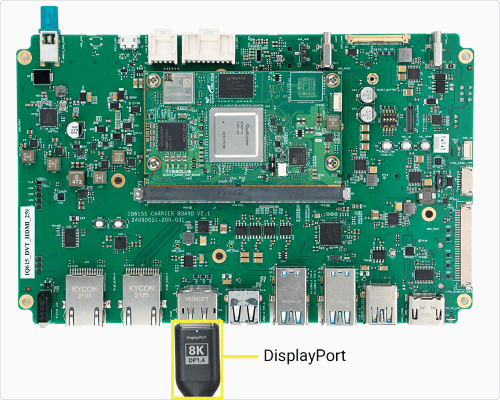
Figure: IQ-615 DisplayPort connection
1. Identify the connector
Run the following command:
This lists the DRM connectors, their IDs, and their connection states.
2. Check connector status and modes
Run the following command:Run the following command:
This reports whether the selected connector is connected. The expected result is
connected.Reference output
This lists the modes reported by the connected display.A connected output normally reports at least one mode. If it is
disconnected, check the cable, monitor power, and selected monitor input. If card0 is absent, use the DRM card reported by modetest.3. Check the active DRM state
If Run the following command:
debugfs is not mounted, run the following command:This makes DRM state and interface debug data available.Run the following command:
This shows the selected connector’s encoder, CRTC, mode, and plane.
Reference output
This shows the kernel DRM state for each connector, encoder, CRTC, and plane.For the selected connector, confirm one active display pipeline:
status: connected- An encoder assigned to that connector
- A nonzero CRTC ID from that encoder
active=yesfor that CRTC- A plane whose
crtcfield matches that CRTC ID
Restore Weston after testing a display mode.To test a different mode, follow Run DRM modetest, then Relaunch Weston before returning to Weston tests.
4. Check interface signals
Run the following command:Run the following command:Run the following command:A working link has nonzero rate and lane values and reports at least one mode. Compare the pixel clock with the active CRTC mode, which
This shows DisplayPort link rate, lane count, and panel timing when the driver provides
dp_debug.Reference output
This prints the DisplayPort link-clock rates in Hz.
Reference output
This prints the DisplayPort pixel-clock rates in Hz.
Reference output
modetest reports in kHz.5. Check current-boot kernel messages and live display events
Run the following command:To capture display events while reproducing the issue, run the following command:
This shows DisplayPort and DRM messages from the current boot only. If it returns no lines, capture live data while reproducing the issue.
Reference output
This follows new Weston and kernel messages. Run it without
-k so the output includes compositor connector changes and output enablement. Reproduce the issue, then press Ctrl+C.Look for connector-state changes, EDID or mode detection, output enablement, and driver errors. Compare the relevant messages with the connector status and active DRM state.AUX or DPCD timeouts point to the cable or port, and failed link training points to link quality.6. Interpret the result
Verify the Weston service before checking the output layout.Run the following command:The expected result is
active. If the service is not active, Relaunch Weston before continuing.7. Check Weston and the output layout
Run the following command:
This shows the latest Weston messages from the current boot.Run the following command if Weston is active but the display is blank:
This lists the available Wayland socket names.Run the following command after replacing the placeholders:
Compare the Weston output with DRM state.This prints Weston output information. Find the selected display output and compare it with the DRM connector and CRTC state. If Weston is inactive, Relaunch Weston before continuing.